VirtualBox#
 |
Documentation#
See http://www.virtualbox.org , attached the user manual
Here is an help output of the main command VBoxManage :
VirtualBox Command Line Management Interface Version 3.0.8
(C) 2005-2009 Sun Microsystems, Inc.
All rights reserved.
Usage:
VBoxManage [-v|--version] print version number and exit
VBoxManage [-q|--nologo] ... suppress the logo
VBoxManage list [--long|-l] vms|runningvms|ostypes|hostdvds|hostfloppies|
bridgedifs|hostonlyifs|dhcpservers|hostinfo|
hddbackends|hdds|dvds|floppies|
usbhost|usbfilters|systemproperties
VBoxManage showvminfo <uuid>|<name> [--details] [--statistics]
[--machinereadable]
VBoxManage registervm <filename>
VBoxManage unregistervm <uuid>|<name> [--delete]
VBoxManage createvm --name <name>
[--ostype <ostype>]
[--register]
[--basefolder <path> | --settingsfile <path>]
[--uuid <uuid>]
VBoxManage modifyvm <uuid|name>
[--name <name>]
[--ostype <ostype>]
[--memory <memorysize in MB>]
[--vram <vramsize in MB>]
[--acpi on|off]
[--ioapic on|off]
[--pae on|off]
[--hwvirtex on|off]
[--nestedpaging on|off]
[--vtxvpid on|off]
[--cpus <number>]
[--monitorcount <number>]
[--accelerate3d <on|off>]
[--bioslogofadein on|off]
[--bioslogofadeout on|off]
[--bioslogodisplaytime <msec>]
[--bioslogoimagepath <imagepath>]
[--biosbootmenu disabled|menuonly|messageandmenu]
[--biossystemtimeoffset <msec>]
[--biospxedebug on|off]
[--boot<1-4> none|floppy|dvd|disk|net>]
[--hd<a|b|d> none|<uuid>|<filename>]
[--idecontroller PIIX3|PIIX4]
[--sata on|off]
[--sataportcount <1-30>]
[--sataport<1-30> none|<uuid>|<filename>]
[--sataideemulation<1-4> <1-30>]
[--scsi on|off]
[--scsiport<1-16> none|<uuid>|<filename>]
[--scsitype LsiLogic|BusLogic]
[--dvd none|<uuid>|<filename>|host:<drive>]
[--dvdpassthrough on|off]
[--floppy disabled|empty|<uuid>|
<filename>|host:<drive>]
[--nic<1-N> none|null|nat|bridged|intnet|hostonly]
[--nictype<1-N> Am79C970A|Am79C973|
82540EM|82543GC|82545EM]
[--cableconnected<1-N> on|off]
[--nictrace<1-N> on|off]
[--nictracefile<1-N> <filename>]
[--nicspeed<1-N> <kbps>]
[--bridgeadapter<1-N> none|<devicename>]
[--hostonlyadapter<1-N> none|<devicename>]
[--intnet<1-N> <network name>]
[--natnet<1-N> <network>|default]
[--macaddress<1-N> auto|<mac>]
[--uart<1-N> off|<I/O base> <IRQ>]
[--uartmode<1-N> disconnected|
server <pipe>|
client <pipe>|
file <file>|
<devicename>]
[--gueststatisticsinterval <seconds>]
[--audio none|null|oss|alsa|pulse]
[--audiocontroller ac97|sb16]
[--clipboard disabled|hosttoguest|guesttohost|
bidirectional]
[--vrdp on|off]
[--vrdpport default|<port>]
[--vrdpaddress <host>]
[--vrdpauthtype null|external|guest]
[--vrdpmulticon on|off]
[--vrdpreusecon on|off]
[--usb on|off]
[--usbehci on|off]
[--snapshotfolder default|<path>]
VBoxManage import <ovf> [--dry-run|-n] [more options]
(run with -n to have options displayed for a particular OVF)
VBoxManage export <machines> --output|-o <ovf>
[--legacy09]
[--vsys <number of virtual system>]
[--product <product name>]
[--producturl <product url>]
[--vendor <vendor name>]
[--vendorurl <vendor url>]
[--version <version info>]
[--eula <license text>]
[--eulafile <filename>]
VBoxManage startvm <uuid>|<name>
[--type gui|sdl|vrdp|headless]
VBoxManage controlvm <uuid>|<name>
pause|resume|reset|poweroff|savestate|
acpipowerbutton|acpisleepbutton|
keyboardputscancode <hex> [<hex> ...]|
injectnmi|
setlinkstate<1-N> on|off |
usbattach <uuid>|<address> |
usbdetach <uuid>|<address> |
dvdattach none|<uuid>|<filename>|host:<drive> |
floppyattach none|<uuid>|<filename>|host:<drive> |
vrdp on|off] |
vrdpport default|<port>] |
setvideomodehint <xres> <yres> <bpp> [display]|
setcredentials <username> <password> <domain>
[--allowlocallogon <yes|no>]
VBoxManage discardstate <uuid>|<name>
VBoxManage adoptstate <uuid>|<name> <state_file>
VBoxManage snapshot <uuid>|<name>
take <name> [--description <desc>] |
discard <uuid>|<name> |
discardcurrent --state|--all |
edit <uuid>|<name>|--current
[--name <name>]
[--description <desc>] |
showvminfo <uuid>|<name>
VBoxManage openmedium disk|dvd|floppy <filename>
[--type normal|immutable|writethrough] (disk only)
VBoxManage closemedium disk|dvd|floppy <uuid>|<filename>
VBoxManage showhdinfo <uuid>|<filename>
VBoxManage createhd --filename <filename>
--size <megabytes>
[--format VDI|VMDK|VHD] (default: VDI)
[--variant Standard,Fixed,Split2G,Stream,ESX]
[--type normal|writethrough] (default: normal)
[--comment <comment>]
[--remember]
VBoxManage modifyhd <uuid>|<filename>
[--type normal|writethrough|immutable]
[--autoreset on|off]
[--compact]
VBoxManage clonehd <uuid>|<filename> <outputfile>
[--format VDI|VMDK|VHD|RAW|<other>]
[--variant Standard,Fixed,Split2G,Stream,ESX]
[--type normal|writethrough|immutable]
[--remember] [--existing]
VBoxManage convertfromraw <filename> <outputfile>
[--format VDI|VMDK|VHD]
[--variant Standard,Fixed,Split2G,Stream,ESX]
VBoxManage convertfromraw stdin <outputfile> <bytes>
[--format VDI|VMDK|VHD]
[--variant Standard,Fixed,Split2G,Stream,ESX]
VBoxManage addiscsidisk --server <name>|<ip>
--target <target>
[--port <port>]
[--lun <lun>]
[--encodedlun <lun>]
[--username <username>]
[--password <password>]
[--type normal|writethrough|immutable]
[--comment <comment>]
[--intnet]
VBoxManage getextradata global|<uuid>|<name>
<key>|enumerate
VBoxManage setextradata global|<uuid>|<name>
<key>
[<value>] (no value deletes key)
VBoxManage setproperty hdfolder default|<folder> |
machinefolder default|<folder> |
vrdpauthlibrary default|<library> |
websrvauthlibrary default|null|<library> |
loghistorycount <value>
VBoxManage usbfilter add <index,0-N>
--target <uuid>|<name>|global
--name <string>
--action ignore|hold (global filters only)
[--active yes|no] (yes)
[--vendorid <XXXX>] (null)
[--productid <XXXX>] (null)
[--revision <IIFF>] (null)
[--manufacturer <string>] (null)
[--product <string>] (null)
[--remote yes|no] (null, VM filters only)
[--serialnumber <string>] (null)
[--maskedinterfaces <XXXXXXXX>]
VBoxManage usbfilter modify <index,0-N>
--target <uuid>|<name>|global
[--name <string>]
[--action ignore|hold] (global filters only)
[--active yes|no]
[--vendorid <XXXX>|""]
[--productid <XXXX>|""]
[--revision <IIFF>|""]
[--manufacturer <string>|""]
[--product <string>|""]
[--remote yes|no] (null, VM filters only)
[--serialnumber <string>|""]
[--maskedinterfaces <XXXXXXXX>]
VBoxManage usbfilter remove <index,0-N>
--target <uuid>|<name>|global
VBoxManage sharedfolder add <vmname>|<uuid>
--name <name> --hostpath <hostpath>
[--transient] [--readonly]
VBoxManage sharedfolder remove <vmname>|<uuid>
--name <name> [--transient]
VBoxManage vmstatistics <vmname>|<uuid> [--reset]
[--pattern <pattern>] [--descriptions]
VBoxManage guestproperty get <vmname>|<uuid>
<property> [--verbose]
VBoxManage guestproperty set <vmname>|<uuid>
<property> [<value> [--flags <flags>]]
VBoxManage guestproperty enumerate <vmname>|<uuid>
[--patterns <patterns>]
VBoxManage guestproperty wait <vmname>|<uuid> <patterns>
[--timeout <milliseconds>] [--fail-on-timeout]
VBoxManage metrics list [*|host|<vmname> [<metric_list>]]
(comma-separated)
VBoxManage metrics setup
[--period <seconds>]
[--samples <count>]
[--list]
[*|host|<vmname> [<metric_list>]]
VBoxManage metrics query [*|host|<vmname> [<metric_list>]]
VBoxManage metrics collect
[--period <seconds>]
[--samples <count>]
[--list]
[--detach]
[*|host|<vmname> [<metric_list>]]
VBoxManage hostonlyif ipconfig <name>
[--dhcp |
--ip<ipv4> [--netmask<ipv4> (def: 255.255.255.0)] |
--ipv6<ipv6> [--netmasklengthv6<length> (def: 64)]]
VBoxManage dhcpserver add|modify --netname <network_name> |
--ifname <hostonly_if_name>
[--ip <ip_address>
--netmask <network_mask>
--lowerip <lower_ip>
--upperip <upper_ip>]
[--enable | --disable]
VBoxManage dhcpserver remove --netname <network_name> |
--ifname <hostonly_if_name>
Installation#
Download from http://www.virtualbox.org/, version :
metskem@gneisenau ~ $ VBoxManage --version
3.0.8r53138
Also install vboxgtk, a graphical interface for VirtualBox.
The main configuration command is VBoxManage .
Create Virtual Machine#
We want to create a virtual machine from a downloaded iso.
I first tried the smallest Linux I could find, tinycore (10 MB), and after that a CentOS live-CD, an Ubuntu 9.04 server and an Ubuntu 9.10 server CD.
- First download the server iso, for example from http://ftp.snt.utwente.nl/pub/linux/ubuntu-releases/jaunty/ubuntu-9.04-server-i386.iso
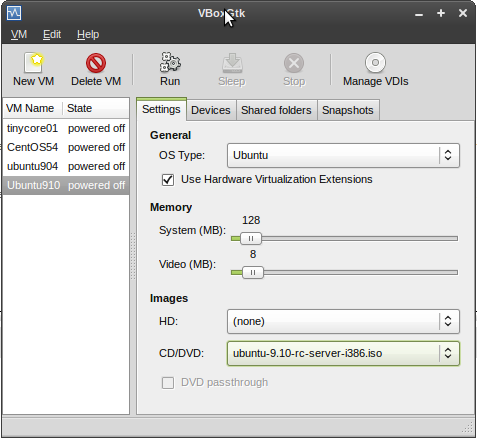
- startup vboxgtk and register the CD image (manage VDI's)
- then create a new VM, and associate it with the ISO, see
 |
- or, better, use the cmdline: VBoxManage createvm :
metskem@gneisenau ~/vbox $ VBoxManage createvm --name ubuntu910 --register --ostype Ubuntu
VirtualBox Command Line Management Interface Version 3.0.8
(C) 2005-2009 Sun Microsystems, Inc.
All rights reserved.

Virtual machine 'ubuntu910' is created and registered.
UUID: 20b27023-e054-4a0a-9080-242dff36ca4b
Settings file: '/home/metskem/.VirtualBox/Machines/ubuntu910/ubuntu910.xml'
- check your results with the VBoxManage list command :
metskem@gneisenau ~/vbox $ VBoxManage list vms
VirtualBox Command Line Management Interface Version 3.0.8
(C) 2005-2009 Sun Microsystems, Inc.
All rights reserved.

"tinycore01" {de160c79-0b97-4773-a4e1-3d4b610e3cbc}
"CentOS54" {ce515eda-41c6-494a-b5b4-3bef38e624d2}
"ubuntu904" {afa59426-fd8d-4bcf-ac4d-e5f385ffd70c}
"ubuntu910" {20b27023-e054-4a0a-9080-242dff36ca4b}
- now alter several attributes of the VM with the VBoxManage modifyvm command :
metskem@gneisenau ~/bin $ vb modifyvm ubuntu910 --memory 255 --vram 1 --pae off --hwvirtex off --boot1 dvd --boot2 disk --hda /home/metskem/.VirtualBox/HardDisks/ubuntu910.vdi --dvd /home/metskem/Downloads/ubuntu-9.10-rc-server-i386.iso --nic1 bridged --bridgeadapter1 wlan0
VirtualBox Command Line Management Interface Version 3.0.8
(C) 2005-2009 Sun Microsystems, Inc.
All rights reserved.
- main memory is 255 MB
- graphics memory 1 MB
- pae (Physical Address Extensions) off
- no hardware virtualization
- bootorder, dvd first, disk second
- attach a vdi file that we will create later
- use bridged networking (most suitable for servers)
- use the host's wlan nic as bridgeadapter
- use the DVD (we need that to boot from the first time)
- create a VDI hd with the VBoxManage createhd command :
metskem@gneisenau ~/.VirtualBox/HardDisks $ VBoxManage createhd --filename ubuntu910.vdi --size 2000 --format VDI
VirtualBox Command Line Management Interface Version 3.0.8
(C) 2005-2009 Sun Microsystems, Inc.
All rights reserved.

0%...10%...20%...30%...40%...50%...60%...70%...80%...90%...100%
Disk image created. UUID: 496dd7fd-2bdb-4255-819b-04ba90cb77ab
metskem@gneisenau ~/.VirtualBox/HardDisks $ ls -l
total 1500192
-rw------- 1 metskem metskem 1536176640 2009-10-25 13:40 hd01
-rw------- 1 metskem metskem       8704 2009-10-25 13:41 ubuntu910.vdi
Starting the VM#
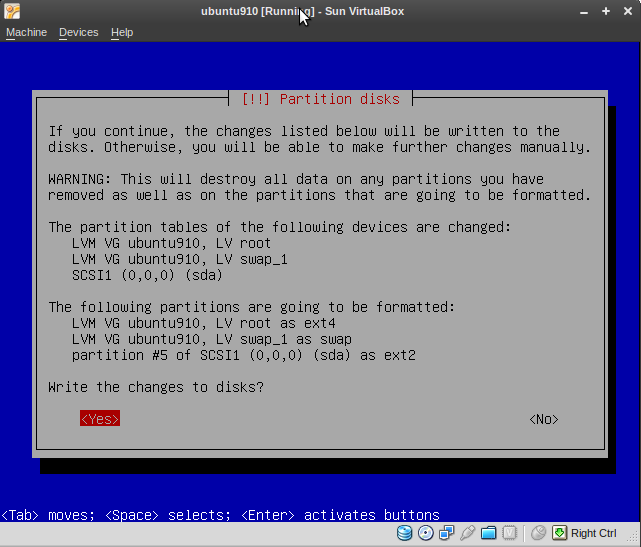
- now fire up the whole thing (you can use the vboxgtk for that) but I prefer cmdline, so : VBoxManage startvm ubuntu910 (that name was given to this VM)
metskem@gneisenau ~/bin $ vb startvm ubuntu910
VirtualBox Command Line Management Interface Version 3.0.8
(C) 2005-2009 Sun Microsystems, Inc.
All rights reserved.

Waiting for the remote session to open...
Remote session has been successfully opened.
This will show a popup and you can go on:
Networking#
The manual (Chapter 6) has more information on this.
I chose bridged networking, as this is most suitable for servers. You can choose a host adapter that acts as the bridge adapter.
On the host this looks like :
metskem@gneisenau ~/bin $ ip a
1: lo: <LOOPBACK,UP,LOWER_UP> mtu 16436 qdisc noqueue state UNKNOWN
    link/loopback 00:00:00:00:00:00 brd 00:00:00:00:00:00
    inet 127.0.0.1/8 scope host lo
    inet6 ::1/128 scope host
       valid_lft forever preferred_lft forever
2: eth0: <NO-CARRIER,BROADCAST,MULTICAST,UP> mtu 1500 qdisc pfifo_fast state DOWN qlen 1000
    link/ether 00:24:81:56:01:f9 brd ff:ff:ff:ff:ff:ff
3: wmaster0: <BROADCAST,MULTICAST,UP,LOWER_UP> mtu 1500 qdisc pfifo_fast state UNKNOWN qlen 1000
    link/ieee802.11 00:22:fa:8f:fd:0a brd ff:ff:ff:ff:ff:ff
4: wlan0: <BROADCAST,MULTICAST,UP,LOWER_UP> mtu 1500 qdisc pfifo_fast state UP qlen 1000
    link/ether 00:22:fa:8f:fd:0a brd ff:ff:ff:ff:ff:ff
    inet 10.0.0.164/24 brd 10.0.0.255 scope global wlan0
    inet6 fe80::222:faff:fe8f:fd0a/64 scope link
       valid_lft forever preferred_lft forever
7: vboxnet0: <BROADCAST,MULTICAST,UP,LOWER_UP> mtu 1500 qdisc pfifo_fast state UNKNOWN qlen 1000
    link/ether 0a:00:27:00:00:00 brd ff:ff:ff:ff:ff:ff
    inet 10.0.2.2/8 brd 10.255.255.255 scope global vboxnet0
    inet6 fe80::800:27ff:fe00:0/64 scope link
       valid_lft forever preferred_lft forever
metskem@gneisenau ~/bin $ ifconfig vboxnet0
vboxnet0  Link encap:Ethernet  HWaddr 0a:00:27:00:00:00
          inet addr:10.0.2.2  Bcast:10.255.255.255  Mask:255.0.0.0
          inet6 addr: fe80::800:27ff:fe00:0/64 Scope:Link
          UP BROADCAST RUNNING MULTICAST  MTU:1500  Metric:1
          RX packets:0 errors:0 dropped:0 overruns:0 frame:0
          TX packets:292 errors:0 dropped:0 overruns:0 carrier:0
          collisions:0 txqueuelen:1000
          RX bytes:0 (0.0 B)  TX bytes:19247 (19.2 KB)

metskem@gneisenau ~/bin $ ip r
10.0.0.0/24 dev wlan0  proto kernel  scope link  src 10.0.0.164  metric 2
10.0.2.0/24 via 10.0.2.2 dev vboxnet0  scope link
10.0.2.0/24 dev vboxnet0  scope link
169.254.0.0/16 dev wlan0  scope link  metric 1000
default via 10.0.0.138 dev wlan0  proto static
On the VM (guest) it looks like this :
root@ubuntu:/etc/init.d# ip a
1: lo: <LOOPBACK,UP,LOWER_UP> mtu 16436 qdisc noqueue state UNKNOWN
    link/loopback 00:00:00:00:00:00 brd 00:00:00:00:00:00
    inet 127.0.0.1/8 scope host lo
    inet6 ::1/128 scope host
       valid_lft forever preferred_lft forever
2: eth0: <BROADCAST,MULTICAST,UP,LOWER_UP> mtu 1500 qdisc pfifo_fast state UNKNOWN qlen 1000
    link/ether 08:00:f5:1f:e9:04 brd ff:ff:ff:ff:ff:ff
    inet 10.0.0.172/24 brd 10.0.0.255 scope global eth0
    inet6 fe80::a00:f5ff:fe1f:e904/64 scope link
       valid_lft forever preferred_lft forever
root@ubuntu:/etc/init.d# ifconfig eth0
eth0      Link encap:Ethernet  HWaddr 08:00:f5:1f:e9:04
          inet addr:10.0.0.172  Bcast:10.0.0.255  Mask:255.255.255.0
          inet6 addr: fe80::a00:f5ff:fe1f:e904/64 Scope:Link
          UP BROADCAST RUNNING MULTICAST  MTU:1500  Metric:1
          RX packets:14721 errors:0 dropped:0 overruns:0 frame:0
          TX packets:14884 errors:0 dropped:0 overruns:0 carrier:0
          collisions:0 txqueuelen:1000
          RX bytes:1074906 (1.0 MB)  TX bytes:14917902 (14.9 MB)
          Interrupt:11 Base address:0xd020

root@ubuntu:/etc/init.d# ip r
10.0.0.0/24 dev eth0  proto kernel  scope link  src 10.0.0.172
default via 10.0.0.138 dev eth0  metric 100
Snapshots#
TODO..............
Management of VM's#
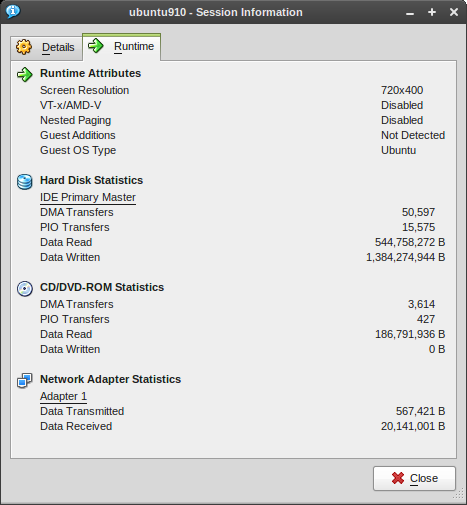
Statistics from the GUI:
MORE TODO................
Nice and Handy to know#
- Use 'Right Ctrl' (the host key) key to capture the mouse/keyboard again
- show VM info with VBoxManage showvminfo <vmname>