VirtualBox#
 |
Installation#
Download from http://www.virtualbox.org/ , version :
metskem@gneisenau ~ $ VBoxManage --version
3.0.8r53138
Also install vboxgtk, a graphical interface for VirtualBox.
The main configuration command is VBoxManage .
Create Virtual Machine#
We want to create a virtual machine from a downloaded iso.
I first tried the smallest Linux I could find, tinycore (10 MB), and after that a CentOS live-CD, an Ubuntu 9.04 server and an Ubuntu 9.10 server CD.
- First download the server iso, for example from http://ftp.snt.utwente.nl/pub/linux/ubuntu-releases/jaunty/ubuntu-9.04-server-i386.iso
- startup vboxgtk and register the CD image (manage VDI's)
- then create a new VM, and associate it with the ISO, see
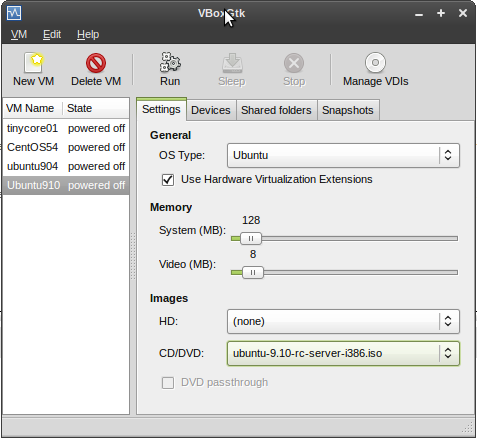 |
- (for each VM an xml file is created, keeping all settings, in this case : ~/.VirtualBox/Machines/ubuntu910/ubuntu910.xml )
- create a VDI hd with the VBoxManage createhd command :
metskem@gneisenau ~/.VirtualBox/HardDisks $ VBoxManage createhd --filename ubuntu910.vdi --size 2000 --format VDI
VirtualBox Command Line Management Interface Version 3.0.8
(C) 2005-2009 Sun Microsystems, Inc.
All rights reserved.

0%...10%...20%...30%...40%...50%...60%...70%...80%...90%...100%
Disk image created. UUID: 496dd7fd-2bdb-4255-819b-04ba90cb77ab
metskem@gneisenau ~/.VirtualBox/HardDisks $ ls -l
total 1500192
-rw------- 1 metskem metskem 1536176640 2009-10-25 13:40 hd01
-rw------- 1 metskem metskem       8704 2009-10-25 13:41 ubuntu910.vdi
- now fire up the VM (you can use the vboxgtk for that) but I prefer cmdline, so : VBoxManage startvm ubuntu910 (that name was given to this VM)
