VirtualBox#
Table of Contents
- VirtualBox
- Documentation
- Installation
- Create Virtual Machine
- Starting the VM
- Networking
- Shared Folders
- Guest properties
- Snapshots
- Installation of guest additions
- Management of VM's
- Setup statistics collection
- Displaying statistics
- Mass VM creation
- Preparing mother system (DSL)
- Preparing mother system (Ubuntu)
- Cloning
- CPU Usage
- Nice and Handy to know
- "Resize harddisk"
- Performance
 |
Documentation#
See http://www.virtualbox.org , attached the user manual
VirtualBox Command Line Management Interface Version 3.0.8
(C) 2005-2009 Sun Microsystems, Inc.
All rights reserved.
Usage:
VBoxManage [-v|--version] print version number and exit
VBoxManage [-q|--nologo] ... suppress the logo
VBoxManage list [--long|-l] vms|runningvms|ostypes|hostdvds|hostfloppies|
bridgedifs|hostonlyifs|dhcpservers|hostinfo|
hddbackends|hdds|dvds|floppies|
usbhost|usbfilters|systemproperties
VBoxManage showvminfo <uuid>|<name> [--details] [--statistics]
[--machinereadable]
VBoxManage registervm <filename>
VBoxManage unregistervm <uuid>|<name> [--delete]
VBoxManage createvm --name <name>
[--ostype <ostype>]
[--register]
[--basefolder <path> | --settingsfile <path>]
[--uuid <uuid>]
VBoxManage modifyvm <uuid|name>
[--name <name>]
[--ostype <ostype>]
[--memory <memorysize in MB>]
[--vram <vramsize in MB>]
[--acpi on|off]
[--ioapic on|off]
[--pae on|off]
[--hwvirtex on|off]
[--nestedpaging on|off]
[--vtxvpid on|off]
[--cpus <number>]
[--monitorcount <number>]
[--accelerate3d <on|off>]
[--bioslogofadein on|off]
[--bioslogofadeout on|off]
[--bioslogodisplaytime <msec>]
[--bioslogoimagepath <imagepath>]
[--biosbootmenu disabled|menuonly|messageandmenu]
[--biossystemtimeoffset <msec>]
[--biospxedebug on|off]
[--boot<1-4> none|floppy|dvd|disk|net>]
[--hd<a|b|d> none|<uuid>|<filename>]
[--idecontroller PIIX3|PIIX4]
[--sata on|off]
[--sataportcount <1-30>]
[--sataport<1-30> none|<uuid>|<filename>]
[--sataideemulation<1-4> <1-30>]
[--scsi on|off]
[--scsiport<1-16> none|<uuid>|<filename>]
[--scsitype LsiLogic|BusLogic]
[--dvd none|<uuid>|<filename>|host:<drive>]
[--dvdpassthrough on|off]
[--floppy disabled|empty|<uuid>|
<filename>|host:<drive>]
[--nic<1-N> none|null|nat|bridged|intnet|hostonly]
[--nictype<1-N> Am79C970A|Am79C973|
82540EM|82543GC|82545EM]
[--cableconnected<1-N> on|off]
[--nictrace<1-N> on|off]
[--nictracefile<1-N> <filename>]
[--nicspeed<1-N> <kbps>]
[--bridgeadapter<1-N> none|<devicename>]
[--hostonlyadapter<1-N> none|<devicename>]
[--intnet<1-N> <network name>]
[--natnet<1-N> <network>|default]
[--macaddress<1-N> auto|<mac>]
[--uart<1-N> off|<I/O base> <IRQ>]
[--uartmode<1-N> disconnected|
server <pipe>|
client <pipe>|
file <file>|
<devicename>]
[--gueststatisticsinterval <seconds>]
[--audio none|null|oss|alsa|pulse]
[--audiocontroller ac97|sb16]
[--clipboard disabled|hosttoguest|guesttohost|
bidirectional]
[--vrdp on|off]
[--vrdpport default|<port>]
[--vrdpaddress <host>]
[--vrdpauthtype null|external|guest]
[--vrdpmulticon on|off]
[--vrdpreusecon on|off]
[--usb on|off]
[--usbehci on|off]
[--snapshotfolder default|<path>]
VBoxManage import <ovf> [--dry-run|-n] [more options]
(run with -n to have options displayed for a particular OVF)
VBoxManage export <machines> --output|-o <ovf>
[--legacy09]
[--vsys <number of virtual system>]
[--product <product name>]
[--producturl <product url>]
[--vendor <vendor name>]
[--vendorurl <vendor url>]
[--version <version info>]
[--eula <license text>]
[--eulafile <filename>]
VBoxManage startvm <uuid>|<name>
[--type gui|sdl|vrdp|headless]
VBoxManage controlvm <uuid>|<name>
pause|resume|reset|poweroff|savestate|
acpipowerbutton|acpisleepbutton|
keyboardputscancode <hex> [<hex> ...]|
injectnmi|
setlinkstate<1-N> on|off |
usbattach <uuid>|<address> |
usbdetach <uuid>|<address> |
dvdattach none|<uuid>|<filename>|host:<drive> |
floppyattach none|<uuid>|<filename>|host:<drive> |
vrdp on|off] |
vrdpport default|<port>] |
setvideomodehint <xres> <yres> <bpp> [display]|
setcredentials <username> <password> <domain>
[--allowlocallogon <yes|no>]
VBoxManage discardstate <uuid>|<name>
VBoxManage adoptstate <uuid>|<name> <state_file>
VBoxManage snapshot <uuid>|<name>
take <name> [--description <desc>] |
discard <uuid>|<name> |
discardcurrent --state|--all |
edit <uuid>|<name>|--current
[--name <name>]
[--description <desc>] |
showvminfo <uuid>|<name>
VBoxManage openmedium disk|dvd|floppy <filename>
[--type normal|immutable|writethrough] (disk only)
VBoxManage closemedium disk|dvd|floppy <uuid>|<filename>
VBoxManage showhdinfo <uuid>|<filename>
VBoxManage createhd --filename <filename>
--size <megabytes>
[--format VDI|VMDK|VHD] (default: VDI)
[--variant Standard,Fixed,Split2G,Stream,ESX]
[--type normal|writethrough] (default: normal)
[--comment <comment>]
[--remember]
VBoxManage modifyhd <uuid>|<filename>
[--type normal|writethrough|immutable]
[--autoreset on|off]
[--compact]
VBoxManage clonehd <uuid>|<filename> <outputfile>
[--format VDI|VMDK|VHD|RAW|<other>]
[--variant Standard,Fixed,Split2G,Stream,ESX]
[--type normal|writethrough|immutable]
[--remember] [--existing]
VBoxManage convertfromraw <filename> <outputfile>
[--format VDI|VMDK|VHD]
[--variant Standard,Fixed,Split2G,Stream,ESX]
VBoxManage convertfromraw stdin <outputfile> <bytes>
[--format VDI|VMDK|VHD]
[--variant Standard,Fixed,Split2G,Stream,ESX]
VBoxManage addiscsidisk --server <name>|<ip>
--target <target>
[--port <port>]
[--lun <lun>]
[--encodedlun <lun>]
[--username <username>]
[--password <password>]
[--type normal|writethrough|immutable]
[--comment <comment>]
[--intnet]
VBoxManage getextradata global|<uuid>|<name>
<key>|enumerate
VBoxManage setextradata global|<uuid>|<name>
<key>
[<value>] (no value deletes key)
VBoxManage setproperty hdfolder default|<folder> |
machinefolder default|<folder> |
vrdpauthlibrary default|<library> |
websrvauthlibrary default|null|<library> |
loghistorycount <value>
VBoxManage usbfilter add <index,0-N>
--target <uuid>|<name>|global
--name <string>
--action ignore|hold (global filters only)
[--active yes|no] (yes)
[--vendorid <XXXX>] (null)
[--productid <XXXX>] (null)
[--revision <IIFF>] (null)
[--manufacturer <string>] (null)
[--product <string>] (null)
[--remote yes|no] (null, VM filters only)
[--serialnumber <string>] (null)
[--maskedinterfaces <XXXXXXXX>]
VBoxManage usbfilter modify <index,0-N>
--target <uuid>|<name>|global
[--name <string>]
[--action ignore|hold] (global filters only)
[--active yes|no]
[--vendorid <XXXX>|""]
[--productid <XXXX>|""]
[--revision <IIFF>|""]
[--manufacturer <string>|""]
[--product <string>|""]
[--remote yes|no] (null, VM filters only)
[--serialnumber <string>|""]
[--maskedinterfaces <XXXXXXXX>]
VBoxManage usbfilter remove <index,0-N>
--target <uuid>|<name>|global
VBoxManage sharedfolder add <vmname>|<uuid>
--name <name> --hostpath <hostpath>
[--transient] [--readonly]
VBoxManage sharedfolder remove <vmname>|<uuid>
--name <name> [--transient]
VBoxManage vmstatistics <vmname>|<uuid> [--reset]
[--pattern <pattern>] [--descriptions]
VBoxManage guestproperty get <vmname>|<uuid>
<property> [--verbose]
VBoxManage guestproperty set <vmname>|<uuid>
<property> [<value> [--flags <flags>]]
VBoxManage guestproperty enumerate <vmname>|<uuid>
[--patterns <patterns>]
VBoxManage guestproperty wait <vmname>|<uuid> <patterns>
[--timeout <milliseconds>] [--fail-on-timeout]
VBoxManage metrics list [*|host|<vmname> [<metric_list>]]
(comma-separated)
VBoxManage metrics setup
[--period <seconds>]
[--samples <count>]
[--list]
[*|host|<vmname> [<metric_list>]]
VBoxManage metrics query [*|host|<vmname> [<metric_list>]]
VBoxManage metrics collect
[--period <seconds>]
[--samples <count>]
[--list]
[--detach]
[*|host|<vmname> [<metric_list>]]
VBoxManage hostonlyif ipconfig <name>
[--dhcp |
--ip<ipv4> [--netmask<ipv4> (def: 255.255.255.0)] |
--ipv6<ipv6> [--netmasklengthv6<length> (def: 64)]]
VBoxManage dhcpserver add|modify --netname <network_name> |
--ifname <hostonly_if_name>
[--ip <ip_address>
--netmask <network_mask>
--lowerip <lower_ip>
--upperip <upper_ip>]
[--enable | --disable]
VBoxManage dhcpserver remove --netname <network_name> |
--ifname <hostonly_if_name>
Installation#
Download from http://www.virtualbox.org/, version :
metskem@gneisenau ~ $ VBoxManage --version
3.0.8r53138
Also install vboxgtk, a graphical interface for VirtualBox.
The main configuration command is VBoxManage .
Create Virtual Machine#
We want to create a virtual machine from a downloaded iso.
I first tried the smallest Linux I could find, tinycore (10 MB), and after that a CentOS live-CD, an Ubuntu 9.04 server and an Ubuntu 9.10 server CD.
- First download the server iso, for example from http://ftp.snt.utwente.nl/pub/linux/ubuntu-releases/jaunty/ubuntu-9.04-server-i386.iso
- startup VirtualBox (or the old vboxgtk) and register the CD image (manage VDI's)
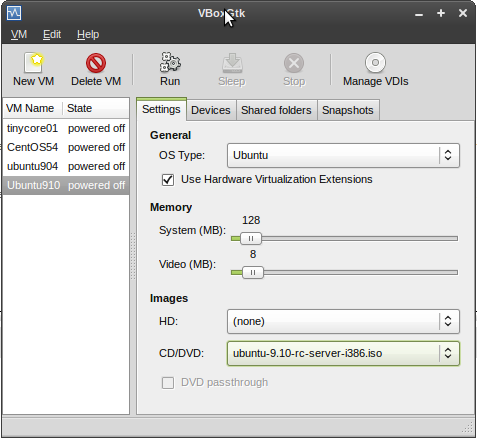
- then create a new VM, and associate it with the ISO, see
 |
- or, better, use the cmdline: VBoxManage createvm :
metskem@gneisenau ~/vbox $ VBoxManage createvm --name ubuntu910 --register --ostype Ubuntu
VirtualBox Command Line Management Interface Version 3.0.8
(C) 2005-2009 Sun Microsystems, Inc.
All rights reserved.

Virtual machine 'ubuntu910' is created and registered.
UUID: 20b27023-e054-4a0a-9080-242dff36ca4b
Settings file: '/home/metskem/.VirtualBox/Machines/ubuntu910/ubuntu910.xml'
- check your results with the VBoxManage list command :
metskem@gneisenau ~/vbox $ VBoxManage list vms
VirtualBox Command Line Management Interface Version 3.0.8
(C) 2005-2009 Sun Microsystems, Inc.
All rights reserved.

"tinycore01" {de160c79-0b97-4773-a4e1-3d4b610e3cbc}
"CentOS54" {ce515eda-41c6-494a-b5b4-3bef38e624d2}
"ubuntu904" {afa59426-fd8d-4bcf-ac4d-e5f385ffd70c}
"ubuntu910" {20b27023-e054-4a0a-9080-242dff36ca4b}
- now alter several attributes of the VM with the VBoxManage modifyvm command :
metskem@gneisenau ~/bin $ vb modifyvm ubuntu910 --memory 255 --vram 1 --pae off --hwvirtex off --boot1 dvd --boot2 disk --hda /home/metskem/.VirtualBox/HardDisks/ubuntu910.vdi --dvd /home/metskem/Downloads/ubuntu-9.10-rc-server-i386.iso --nic1 bridged --bridgeadapter1 wlan0 --vrdp on --vrdp 10910
VirtualBox Command Line Management Interface Version 3.0.8
(C) 2005-2009 Sun Microsystems, Inc.
All rights reserved.
- main memory is 255 MB
- graphics memory 1 MB
- pae (Physical Address Extensions) off
- no hardware virtualization
- bootorder, dvd first, disk second
- attach a vdi file that we will create later
- use bridged networking (most suitable for servers)
- use the host's wlan nic as bridgeadapter
- use the DVD (we need that to boot from the first time)
- if started headless (with VBoxHeadless cmd), use port 10910
- create a VDI hd with the VBoxManage createhd command :
metskem@gneisenau ~/.VirtualBox/HardDisks $ VBoxManage createhd --filename ubuntu910.vdi --size 2000 --format VDI --remember
VirtualBox Command Line Management Interface Version 3.0.8
(C) 2005-2009 Sun Microsystems, Inc.
All rights reserved.

0%...10%...20%...30%...40%...50%...60%...70%...80%...90%...100%
Disk image created. UUID: 496dd7fd-2bdb-4255-819b-04ba90cb77ab
metskem@gneisenau ~/.VirtualBox/HardDisks $ ls -l
total 1500192
-rw------- 1 metskem metskem 1536176640 2009-10-25 13:40 hd01
-rw------- 1 metskem metskem       8704 2009-10-25 13:41 ubuntu910.vdi
Starting the VM#
- now fire up the whole thing (you can use the vboxgtk for that) but I prefer cmdline, so : VBoxManage startvm ubuntu910 (that name was given to this VM)
metskem@gneisenau ~/bin $ vb startvm ubuntu910
VirtualBox Command Line Management Interface Version 3.0.8
(C) 2005-2009 Sun Microsystems, Inc.
All rights reserved.

Waiting for the remote session to open...
Remote session has been successfully opened.
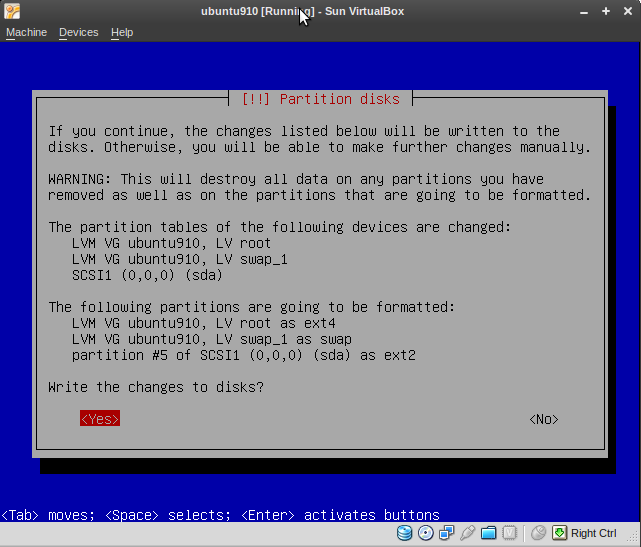
This will show a popup and you can go on:
Networking#
The manual (Chapter 6) has more information on this.
I chose bridged networking, as this is most suitable for servers. You can choose a host adapter that acts as the bridge adapter.
On the host this looks like :
metskem@gneisenau ~/bin $ ip a
1: lo: <LOOPBACK,UP,LOWER_UP> mtu 16436 qdisc noqueue state UNKNOWN
    link/loopback 00:00:00:00:00:00 brd 00:00:00:00:00:00
    inet 127.0.0.1/8 scope host lo
    inet6 ::1/128 scope host
       valid_lft forever preferred_lft forever
2: eth0: <NO-CARRIER,BROADCAST,MULTICAST,UP> mtu 1500 qdisc pfifo_fast state DOWN qlen 1000
    link/ether 00:24:81:56:01:f9 brd ff:ff:ff:ff:ff:ff
3: wmaster0: <BROADCAST,MULTICAST,UP,LOWER_UP> mtu 1500 qdisc pfifo_fast state UNKNOWN qlen 1000
    link/ieee802.11 00:22:fa:8f:fd:0a brd ff:ff:ff:ff:ff:ff
4: wlan0: <BROADCAST,MULTICAST,UP,LOWER_UP> mtu 1500 qdisc pfifo_fast state UP qlen 1000
    link/ether 00:22:fa:8f:fd:0a brd ff:ff:ff:ff:ff:ff
    inet 10.0.0.164/24 brd 10.0.0.255 scope global wlan0
    inet6 fe80::222:faff:fe8f:fd0a/64 scope link
       valid_lft forever preferred_lft forever
7: vboxnet0: <BROADCAST,MULTICAST,UP,LOWER_UP> mtu 1500 qdisc pfifo_fast state UNKNOWN qlen 1000
    link/ether 0a:00:27:00:00:00 brd ff:ff:ff:ff:ff:ff
    inet 10.0.2.2/8 brd 10.255.255.255 scope global vboxnet0
    inet6 fe80::800:27ff:fe00:0/64 scope link
       valid_lft forever preferred_lft forever
metskem@gneisenau ~/bin $ ifconfig vboxnet0
vboxnet0  Link encap:Ethernet  HWaddr 0a:00:27:00:00:00
          inet addr:10.0.2.2  Bcast:10.255.255.255  Mask:255.0.0.0
          inet6 addr: fe80::800:27ff:fe00:0/64 Scope:Link
          UP BROADCAST RUNNING MULTICAST  MTU:1500  Metric:1
          RX packets:0 errors:0 dropped:0 overruns:0 frame:0
          TX packets:292 errors:0 dropped:0 overruns:0 carrier:0
          collisions:0 txqueuelen:1000
          RX bytes:0 (0.0 B)  TX bytes:19247 (19.2 KB)

metskem@gneisenau ~/bin $ ip r
10.0.0.0/24 dev wlan0  proto kernel  scope link  src 10.0.0.164  metric 2
10.0.2.0/24 via 10.0.2.2 dev vboxnet0  scope link
10.0.2.0/24 dev vboxnet0  scope link
169.254.0.0/16 dev wlan0  scope link  metric 1000
default via 10.0.0.138 dev wlan0  proto static
On the VM (guest) it looks like this :
root@ubuntu:/etc/init.d# ip a
1: lo: <LOOPBACK,UP,LOWER_UP> mtu 16436 qdisc noqueue state UNKNOWN
    link/loopback 00:00:00:00:00:00 brd 00:00:00:00:00:00
    inet 127.0.0.1/8 scope host lo
    inet6 ::1/128 scope host
       valid_lft forever preferred_lft forever
2: eth0: <BROADCAST,MULTICAST,UP,LOWER_UP> mtu 1500 qdisc pfifo_fast state UNKNOWN qlen 1000
    link/ether 08:00:f5:1f:e9:04 brd ff:ff:ff:ff:ff:ff
    inet 10.0.0.172/24 brd 10.0.0.255 scope global eth0
    inet6 fe80::a00:f5ff:fe1f:e904/64 scope link
       valid_lft forever preferred_lft forever
root@ubuntu:/etc/init.d# ifconfig eth0
eth0      Link encap:Ethernet  HWaddr 08:00:f5:1f:e9:04
          inet addr:10.0.0.172  Bcast:10.0.0.255  Mask:255.255.255.0
          inet6 addr: fe80::a00:f5ff:fe1f:e904/64 Scope:Link
          UP BROADCAST RUNNING MULTICAST  MTU:1500  Metric:1
          RX packets:14721 errors:0 dropped:0 overruns:0 frame:0
          TX packets:14884 errors:0 dropped:0 overruns:0 carrier:0
          collisions:0 txqueuelen:1000
          RX bytes:1074906 (1.0 MB)  TX bytes:14917902 (14.9 MB)
          Interrupt:11 Base address:0xd020

root@ubuntu:/etc/init.d# ip r
10.0.0.0/24 dev eth0  proto kernel  scope link  src 10.0.0.172
default via 10.0.0.138 dev eth0  metric 100
Shared Folders#
This feature is only available when you install the guest additions.
Once you defined a shared folder for a guest, you can access inside the guest with an NFS-like mount :
mount -t vboxsf SharedFolderDefault /tmp/ff .
I could not get this to work, I keep getting
Guest properties#
This is also only available when guest additions have been installed.
You can assign (from the host) key/values to a guest , and after that you can read (and/or write) those values from within the guest.
vb guestproperty set ubuntu910 GUESTNAME ubuntu910 --flags RDONLYGUEST
And then in the guest :
root@ubuntuminimal:/proc# VBoxControl guestproperty enumerate
VirtualBox Guest Additions Command Line Management Interface Version 3.0.10
(C) 2008 Sun Microsystems, Inc.
All rights reserved.

Name: /VirtualBox/HostGuest/SysprepExec, value: <NULL>, timestamp: 1257533847419218000, flags: TRANSIENT, RDONLYGUEST
Name: /VirtualBox/HostGuest/SysprepArgs, value: <NULL>, timestamp: 1257533847419316000, flags: TRANSIENT, RDONLYGUEST
Name: /VirtualBox/GuestInfo/OS/Product, value: Linux, timestamp: 1257533870949479000, flags: <NULL>
Name: /VirtualBox/GuestInfo/OS/Release, value: 2.6.31-14-generic, timestamp: 1257533870949929000, flags: <NULL>
Name: /VirtualBox/GuestInfo/OS/Version, value: #48-Ubuntu SMP Fri Oct 16 14:04:26 UTC 2009, timestamp: 1257533870950252000, flags: <NULL>
Name: /VirtualBox/GuestInfo/OS/ServicePack, value: <NULL>, timestamp: 1257533870950573000, flags: <NULL>
Name: /VirtualBox/GuestAdd/Version, value: 3.0.10, timestamp: 1257533870950879000, flags: <NULL>
Name: /VirtualBox/GuestAdd/Revision, value: 54097, timestamp: 1257533870951186000, flags: <NULL>
Name: /VirtualBox/GuestInfo/OS/LoggedInUsers, value: 1, timestamp: 1257535893474621000, flags: <NULL>
Name: /VirtualBox/GuestInfo/OS/NoLoggedInUsers, value: false, timestamp: 1257533900982916000, flags: <NULL>
Name: /VirtualBox/GuestInfo/Net/Count, value: 1, timestamp: 1257535893475150000, flags: <NULL>
Name: /VirtualBox/GuestInfo/Net/0/V4/IP, value: 10.0.0.177, timestamp: 1257535893475491000, flags: <NULL>
Name: /VirtualBox/GuestInfo/Net/0/V4/Broadcast, value: 10.0.0.255, timestamp: 1257535893476082000, flags: <NULL>
Name: /VirtualBox/GuestInfo/Net/0/V4/Netmask, value: 255.255.255.0, timestamp: 1257535893476291000, flags: <NULL>
Name: /VirtualBox/GuestInfo/Net/0/Status, value: Up, timestamp: 1257535893476635000, flags: <NULL>
Name: /VirtualBox/HostInfo/GUI/LanguageID, value: C, timestamp: 1257533747000847000, flags: <NULL>
Name: /VirtualBox/HostInfo/VBoxVer, value: 3.0.10, timestamp: 1257533847421017000, flags: TRANSIENT, RDONLYGUEST
Name: /VirtualBox/HostInfo/VBoxRev, value: 54097, timestamp: 1257533847421081000, flags: TRANSIENT, RDONLYGUEST
Name: /VirtualBox/GuestInfo/OS/LoggedInUsersList, value: metskem, timestamp: 1257535893474087000, flags: <NULL>
Name: GUESTNAME, value: ubuntu910_minimal, timestamp: 1257535894696852000, flags: <NULL>
Snapshots#
TODO..............
Installation of guest additions#
- scp file /usr/share/virtualbox/VBoxGuestAdditions.iso from the host to your guest
- login to guest and mount the iso mkdir /tmp/ff && sudo mount -o loop /tmp/VBoxGuestAdditions.iso /tmp/ff
- apt-get install linux-headers-2.6.31-14 linux-headers-2.6.31-14-generic gcc
- run it:
root@ubuntuminimal:/tmp/ff# ./VBoxLinuxAdditions-x86.run
Verifying archive integrity... All good.
Uncompressing VirtualBox 3.0.10 Guest Additions for Linux installation........................................................
VirtualBox 3.0.10 Guest Additions installation
Building the VirtualBox Guest Additions kernel module...
Building the shared folder support kernel module...
Building the drm support kernel module...
Installing the VirtualBox Guest Additions...

Could not find X.org or XFree86 on the guest system.  The X Window drivers
will not be installed.
Management of VM's#
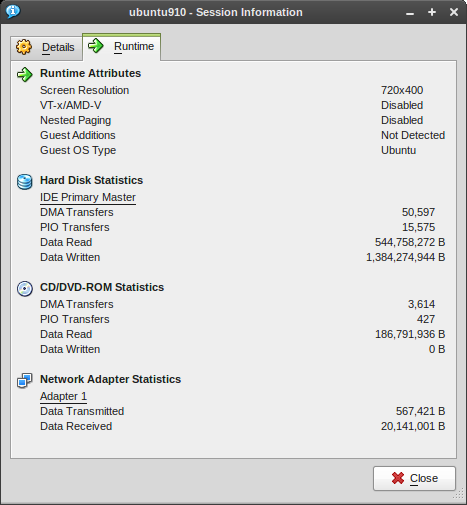
Statistics from the GUI:
Setup statistics collection#
Use the VBoxManage metrics setup command :
metskem@gneisenau ~/bin $ VBoxManage metrics setup --period 10 --samples 600 ubuntu910 CPU/Load,RAM/Usage
VirtualBox Command Line Management Interface Version 3.0.8
(C) 2005-2009 Sun Microsystems, Inc.
All rights reserved.
You can display the current collection settings with the VBoxManage metrics list _ command
metskem@gneisenau ~/bin $ vb metrics list ubuntu910
VirtualBox Command Line Management Interface Version 3.0.8
(C) 2005-2009 Sun Microsystems, Inc.
All rights reserved.

Object     Metric               Unit Minimum    Maximum    Period     Count      Description
---------- -------------------- ---- ---------- ---------- ---------- ---------- -----------
ubuntu910  CPU/Load/User        %             0     100000         10        600 Percentage of processor time spent in user mode by VM process.
ubuntu910  CPU/Load/User:avg    %             0     100000         10          1
ubuntu910  CPU/Load/User:min    %             0     100000         10          1
ubuntu910  CPU/Load/User:max    %             0     100000         10          1
ubuntu910  CPU/Load/Kernel      %             0     100000         10        600 Percentage of processor time spent in kernel mode by VM process.
ubuntu910  CPU/Load/Kernel:avg  %             0     100000         10          1
ubuntu910  CPU/Load/Kernel:min  %             0     100000         10          1
ubuntu910  CPU/Load/Kernel:max  %             0     100000         10          1
ubuntu910  RAM/Usage/Used       kB            0 2147483647         10        600 Size of resident portion of VM process in memory.
ubuntu910  RAM/Usage/Used:avg   kB            0 2147483647         10          1
ubuntu910  RAM/Usage/Used:min   kB            0 2147483647         10          1
ubuntu910  RAM/Usage/Used:max   kB            0 2147483647         10          1
Displaying statistics #
Use the VBoxManage metrics query command to display usage stats :
metskem@gneisenau ~/bin $ vb metrics query ubuntu910
VirtualBox Command Line Management Interface Version 3.0.8
(C) 2005-2009 Sun Microsystems, Inc.
All rights reserved.

Object     Metric               Values
---------- -------------------- --------------------------------------------
ubuntu910  CPU/Load/User        0.22%, 0.09%, 0.15%, 0.30%, 0.20%, 0.15%, 0.36%, 0.09%, 0.30%, 0.15%, 0.15%, 0.40%, 0.25%, 0.35%, 0.20%, 0.22%, 0.40%
ubuntu910  CPU/Load/User:avg    0.23%
ubuntu910  CPU/Load/User:min    0.09%
ubuntu910  CPU/Load/User:max    0.40%
ubuntu910  CPU/Load/Kernel      0.18%, 0.09%, 0.15%, 0.35%, 0.30%, 0.25%, 0.27%, 0.09%, 0.20%, 0.20%, 0.10%, 0.20%, 0.15%, 0.20%, 0.30%, 0.18%, 0.25%
ubuntu910  CPU/Load/Kernel:avg  0.20%
ubuntu910  CPU/Load/Kernel:min  0.09%
ubuntu910  CPU/Load/Kernel:max  0.35%
ubuntu910  RAM/Usage/Used       136452 kB, 136452 kB, 136452 kB, 136452 kB, 136452 kB, 136452 kB, 136452 kB, 136452 kB, 136452 kB, 136452 kB, 136452 kB, 136452 kB, 136452 kB, 136452 kB, 136452 kB, 136452 kB, 136452 kB
ubuntu910  RAM/Usage/Used:avg   136452 kB
ubuntu910  RAM/Usage/Used:min   136452 kB
ubuntu910  RAM/Usage/Used:max   136452 kB
Mass VM creation#
Preparing mother system (DSL)#
I created a fairly small Linux image with a DSL (Damn Small Linux) distro.
This guy runs with only 24M RAM.
The following was done to create this one :
- download iso image
- vb createvm --name dsl01 --register --ostype Linux
- vb createhd --filename HardDisks/dsl01disk.vdi --size 250 --format VDI --remember
- vb modifyvm dsl01 --memory 24 --vram 1 --pae off --hwvirtex off --boot1 dvd --boot2 disk --hda HardDisks/dsl01disk.vdi --dvd /home/metskem/Downloads/dsl.iso --nic1 bridged --bridgeadapter1 wlan0
- give the VM a name that can be queried by the guest: vb guestproperty set dsl01 vmname dsl01 -flags RDONLYGUEST
- to use this name in the guest, you first have to install the guest additions, see Chapter 4.3.1 Installing the Linux Guest Additions
- start the vm with vb startvm dsl01
- make sure the ssh daemon is started during boot so we can remote login, create symlink in /etc/rc5.d: S25ssh -> ../init.d/ssh
- set password for user dsl
- create the following script and create symlink in /etc/rc5.d: S22tellip -> ../init.d/tellip.sh :
IP=`ifconfig eth0|grep inet|awk '{ print $2}'|awk -F: '{print $2}'`
wget -q -O - http://www.computerhok.nl/IAM:$IP
Preparing mother system (Ubuntu)#
The same thing was done with a rather minimal Ubuntu910 server.
To summarize :
- 1.5 GB filesystem
- set the hostname inside the guest to guestproperty GUESTNAME by adding the following to /etc/rc.local:
#  set the hostname to the value that is set by the hypervisor
HostName=`VBoxControl guestproperty get GUESTNAME | grep Value | cut -d' ' -f2`
hostname $HostName
echo $HostName > /etc/hostname
logger "$0 : hostname set to $HostName"
- store my id_rsa.pub file in ~/.ssh
- visudo so that I can easily su without prompting
- removing /etc/udev/rules.d/70-persistent-net.rules (or you get eth1 in use instead of eth0 on the cloned guest)
Cloning #
Now I want to clone this and create a whole lot of them (in a script). The following actions the have to be done (XX = sequencenumber) :
- vb clonehd HardDisks/dsl01disk.vdi HardDisks/dslXXdisk.vdi --remember
- vb createvm --name dslXX --register --ostype Linux
- vb modifyvm dslXX --memory 24 --vram 1 --pae off --hwvirtex off --boot1 disk --hda HardDisks/dslXXdisk.vdi --nic1 bridged --bridgeadapter1 wlan0
See the following simple script :
#!/bin/sh
#
#  script to generate VBoxManage VMs
#
NUMVMS=$1
for N in `seq 2 $NUMVMS`
do
  echo "Creating VM $N"
  VBoxManage clonehd HardDisks/dsl01disk.vdi HardDisks/dsl${N}disk.vdi --remember
  VBoxManage createvm --name dsl$N --register --ostype Linux
  VBoxManage modifyvm dsl$N --memory 24 --vram 1 --pae off --hwvirtex off --boot1 disk --hda HardDisks/dsl${N}disk.vdi --nic1 bridged --bridgeadapter1 wlan0 --vrdp on --vrdpport 100$N
done
echo ""
echo "VirtualBox's known VMs :"
echo " -------------------------------------------------------------"
VBoxManage list vms
echo ""
echo ""
echo "VirtualBox's known HDDs :"
echo " -------------------------------------------------------------"
VBoxManage list hdds
Or the new script for Ubuntu:
#!/bin/sh
#
#  script to generate VBoxManage VMs
#
NUMVMS=$1
for N in `seq 1 $NUMVMS`
do
  echo "Creating VM $N"
  VBoxManage clonehd HardDisks/ubuntu910disk.vdi HardDisks/ubm${N}disk.vdi --remember
  VBoxManage createvm --name ubm$N --register --ostype Ubuntu
  VRDPPORT=`expr 10000 + $N`
  VBoxManage modifyvm ubm$N --memory 64 --vram 6 --boot1 disk --hda HardDisks/ubm${N}disk.vdi --nic1 bridged --bridgeadapter1 wlan0 --vrdp on --vrdpport $VRDPPORT
  VBoxManage guestproperty set ubm$N GUESTNAME ubm$N --flags RDONLYGUEST
done
echo ""
echo "VirtualBox's known VMs :"
echo " -------------------------------------------------------------"
VBoxManage list vms
#echo ""
#echo ""
#echo "VirtualBox's known HDDs :"
#echo " -------------------------------------------------------------"
#VBoxManage list hdds
CPU Usage #
Tickless kernel
Running 5 dsl guests concurrently almost eats 50 % of the host system, I suspect that the non-tickless (2.4) kernel of DSL is the cause of that.
So I did the same clone excercise with a brand new Ubuntu 9.10 (2.6.31 kernel), which has a tickless kernel (CONFIG_NO_HZ).
These guests run with 64 MB, 1 GB VDI file (680 MB hda for the guest, the rest is swap).
One caveat with eth0 eth1 , I solved that by removing /etc/udev/rules.d/70-persistent-net.rules
CPU Affinity
Another thing that is mentioned on the forums is that assigning cpu aff. to a process reduces CPU consumption of a guest.
Experimented this by running two identical guests for many hours, one with aff. (ubm1) and another one without aff. (ubm2), here are the start commands :
taskset -c 0 VBoxManage startvm ubm1 --type headless
VBoxManage startvm ubm2 --type headless
After a couple of hours, we look at the cpu time :
metskem@gneisenau ~/Downloads $ ps -f -p 10591 10622
UID        PID  PPID  C STIME TTY      STAT   TIME CMD
metskem  10591  9922  0 Nov03 ?        Sl     7:44 /usr/lib/virtualbox/VBoxHeadless --comment ubm1 --startvm 59034198-f98e-447d-896d-cd87cead96c2 --vrdp off
metskem  10622  9922  0 Nov03 ?        Sl    12:13 /usr/lib/virtualbox/VBoxHeadless --comment ubm2 --startvm 108de229-caef-4fb8-b4bf-973155c945d1 --vrdp off
As you can see, this makes quite a difference, 464 seconds versus 733 seconds ( 37 % less CPU usage )
Just to be sure I started two additional guests :
metskem@gneisenau ~/Downloads $ taskset -c 1 VBoxManage startvm ubm3 --type headless
VirtualBox Command Line Management Interface Version 3.0.10
(C) 2005-2009 Sun Microsystems, Inc.
All rights reserved.

Waiting for the remote session to open...
Remote session has been successfully opened.
metskem@gneisenau ~/Downloads $ VBoxManage startvm ubm4  --type headless
VirtualBox Command Line Management Interface Version 3.0.10
(C) 2005-2009 Sun Microsystems, Inc.
All rights reserved.

Waiting for the remote session to open...
Remote session has been successfully opened.
metskem@gneisenau ~/Downloads $ vb list runningvms
VirtualBox Command Line Management Interface Version 3.0.10
(C) 2005-2009 Sun Microsystems, Inc.
All rights reserved.

"ubm1" {59034198-f98e-447d-896d-cd87cead96c2}
"ubm2" {108de229-caef-4fb8-b4bf-973155c945d1}
"ubm3" {6f01d4b5-1628-428b-9d37-1226a5e774bd}
"ubm4" {bd613011-305d-469a-8492-15977ffdcc49}
Results:
metskem@gneisenau ~/vbox $ ps -f -p 17654 17687
UID        PID  PPID  C STIME TTY      STAT   TIME CMD
metskem  17654  9922  0 Nov04 ?        Sl     4:33 /usr/lib/virtualbox/VBoxHeadless --comment ubm3 --startvm 6f01d4b5-1628-428b-9d37-1226a5e774bd --vrdp off
metskem  17687  9922  0 Nov04 ?        Sl     5:01 /usr/lib/virtualbox/VBoxHeadless --comment ubm4 --startvm bd613011-305d-469a-8492-15977ffdcc49 --vrdp off
Nice and Handy to know#
- Use 'Right Ctrl' (the host key) key to capture the mouse/keyboard again
- show VM info with VBoxManage showvminfo <vmname>
- start your VM's with VBoxHeadless --startvm ubuntu910 --vrdp=config, this way you don't need X on the host, and you still have console access via rdesktop, the vrdp config is read from the configxml (port is important if you run multiple guests)
- set UTC=no in /etc/default/rcS (or dhclient will fail during start, and you get a DHCP address one hour after the boot)
- most proper start command : nohup taskset -c 0 VBoxHeadless --startvm ubm1 &
- how to determine the ip address of the guest (DHCP):
metskem@gneisenau ~/vbox $ vb guestproperty enumerate ubuntu910 | grep IP
Name: /VirtualBox/GuestInfo/Net/0/V4/IP, value: 10.0.0.177, timestamp: 1257594803542047000, flags:
- what irritated me is that the output of the VBoxManage command is always cluttered with Sun advertisement :
VirtualBox Command Line Management Interface Version 3.0.10
(C) 2005-2009 Sun Microsystems, Inc.
All rights reserved.
also the long command name VBoxManage with two capitals in it is not quick to type, so I got rid of that by create this one line script :
VBoxManage $* |grep -v 'VirtualBox Command Line Management Interface Version' | grep -v 'Sun Microsystems, Inc.' | grep -v 'All rights reserved'
"Resize harddisk"#
Sooner or later you run into the situation that your guest's hda is full, and you need a larger one.
Do the following :
- create a new (larger) vdi vb createhd --filename HardDisks/ubuntu910disk.vdi --size 1500M --remember
- attach it to the guest: vb modifyvm --hdb HardDisks/ubuntu910disk.vdi
- boot the VM
- logon and copy disks : sudo dd if=/dev/sda of=/dev/sdb bs=2M
- shutdown VM
- reassign disk for VM:
- vb modifyvm ubuntu910_minimal --hda none --hdb none
- vb modifyvm ubuntu910_minimal --hda HardDisks/ubuntu910disk.vdi
- reboot the VM
- now the physical disk is larger, but you are not there yet (this guest uses LVM :-) ) :
- fdisk /dev/sda3 , create new primary partition (nr3), write partition table and quit
- signal the kernel that partition table has changed : partprobe
- create new physical volume : pvcreate /dev/sda3
- add it to the existing volume group vgextend ubuntuminimal /dev/sda3
- extend the logical volume: lvextend --size +532M /dev/ubuntuminimal/root
- resize the filesystem: resize2fs /dev/mapper/ubuntuminimal-root 1160M
Performance#
I wanted to get an idea of much overhead there is, so comparing running a load on native hardware against running under VirtualBox.
Now you do a complete study on this subject, but no time for that.
I did just one very simple test :
metskem@ubm7:/tmp$ time tar -czf /tmp/ff.tar /usr/*
tar: Removing leading `/' from member names
tar: Removing leading `/' from hard link targets

real	1m20.259s
user	0m27.586s
sys	0m27.286s
Then scp this tar file to the host, untar it to a temp directory and tar it again in the same way :
metskem@gneisenau /tmp/fff $ time tar -czf /tmp/ffnative.tar usr

real	0m29.273s
user	0m26.282s
sys	0m1.284s
| type | host | guest |
|---|---|---|
| real | 29 | 80 |
| user | 26 | 28 |
| sys | 1 | 27 |