VirtualBox#
 |
Documentation#
See http://www.virtualbox.org , attached the user manual
VirtualBox Command Line Management Interface Version 3.0.8
(C) 2005-2009 Sun Microsystems, Inc.
All rights reserved.
Usage:
VBoxManage [-v|--version] print version number and exit
VBoxManage [-q|--nologo] ... suppress the logo
VBoxManage list [--long|-l] vms|runningvms|ostypes|hostdvds|hostfloppies|
bridgedifs|hostonlyifs|dhcpservers|hostinfo|
hddbackends|hdds|dvds|floppies|
usbhost|usbfilters|systemproperties
VBoxManage showvminfo <uuid>|<name> [--details] [--statistics]
[--machinereadable]
VBoxManage registervm <filename>
VBoxManage unregistervm <uuid>|<name> [--delete]
VBoxManage createvm --name <name>
[--ostype <ostype>]
[--register]
[--basefolder <path> | --settingsfile <path>]
[--uuid <uuid>]
VBoxManage modifyvm <uuid|name>
[--name <name>]
[--ostype <ostype>]
[--memory <memorysize in MB>]
[--vram <vramsize in MB>]
[--acpi on|off]
[--ioapic on|off]
[--pae on|off]
[--hwvirtex on|off]
[--nestedpaging on|off]
[--vtxvpid on|off]
[--cpus <number>]
[--monitorcount <number>]
[--accelerate3d <on|off>]
[--bioslogofadein on|off]
[--bioslogofadeout on|off]
[--bioslogodisplaytime <msec>]
[--bioslogoimagepath <imagepath>]
[--biosbootmenu disabled|menuonly|messageandmenu]
[--biossystemtimeoffset <msec>]
[--biospxedebug on|off]
[--boot<1-4> none|floppy|dvd|disk|net>]
[--hd<a|b|d> none|<uuid>|<filename>]
[--idecontroller PIIX3|PIIX4]
[--sata on|off]
[--sataportcount <1-30>]
[--sataport<1-30> none|<uuid>|<filename>]
[--sataideemulation<1-4> <1-30>]
[--scsi on|off]
[--scsiport<1-16> none|<uuid>|<filename>]
[--scsitype LsiLogic|BusLogic]
[--dvd none|<uuid>|<filename>|host:<drive>]
[--dvdpassthrough on|off]
[--floppy disabled|empty|<uuid>|
<filename>|host:<drive>]
[--nic<1-N> none|null|nat|bridged|intnet|hostonly]
[--nictype<1-N> Am79C970A|Am79C973|
82540EM|82543GC|82545EM]
[--cableconnected<1-N> on|off]
[--nictrace<1-N> on|off]
[--nictracefile<1-N> <filename>]
[--nicspeed<1-N> <kbps>]
[--bridgeadapter<1-N> none|<devicename>]
[--hostonlyadapter<1-N> none|<devicename>]
[--intnet<1-N> <network name>]
[--natnet<1-N> <network>|default]
[--macaddress<1-N> auto|<mac>]
[--uart<1-N> off|<I/O base> <IRQ>]
[--uartmode<1-N> disconnected|
server <pipe>|
client <pipe>|
file <file>|
<devicename>]
[--gueststatisticsinterval <seconds>]
[--audio none|null|oss|alsa|pulse]
[--audiocontroller ac97|sb16]
[--clipboard disabled|hosttoguest|guesttohost|
bidirectional]
[--vrdp on|off]
[--vrdpport default|<port>]
[--vrdpaddress <host>]
[--vrdpauthtype null|external|guest]
[--vrdpmulticon on|off]
[--vrdpreusecon on|off]
[--usb on|off]
[--usbehci on|off]
[--snapshotfolder default|<path>]
VBoxManage import <ovf> [--dry-run|-n] [more options]
(run with -n to have options displayed for a particular OVF)
VBoxManage export <machines> --output|-o <ovf>
[--legacy09]
[--vsys <number of virtual system>]
[--product <product name>]
[--producturl <product url>]
[--vendor <vendor name>]
[--vendorurl <vendor url>]
[--version <version info>]
[--eula <license text>]
[--eulafile <filename>]
VBoxManage startvm <uuid>|<name>
[--type gui|sdl|vrdp|headless]
VBoxManage controlvm <uuid>|<name>
pause|resume|reset|poweroff|savestate|
acpipowerbutton|acpisleepbutton|
keyboardputscancode <hex> [<hex> ...]|
injectnmi|
setlinkstate<1-N> on|off |
usbattach <uuid>|<address> |
usbdetach <uuid>|<address> |
dvdattach none|<uuid>|<filename>|host:<drive> |
floppyattach none|<uuid>|<filename>|host:<drive> |
vrdp on|off] |
vrdpport default|<port>] |
setvideomodehint <xres> <yres> <bpp> [display]|
setcredentials <username> <password> <domain>
[--allowlocallogon <yes|no>]
VBoxManage discardstate <uuid>|<name>
VBoxManage adoptstate <uuid>|<name> <state_file>
VBoxManage snapshot <uuid>|<name>
take <name> [--description <desc>] |
discard <uuid>|<name> |
discardcurrent --state|--all |
edit <uuid>|<name>|--current
[--name <name>]
[--description <desc>] |
showvminfo <uuid>|<name>
VBoxManage openmedium disk|dvd|floppy <filename>
[--type normal|immutable|writethrough] (disk only)
VBoxManage closemedium disk|dvd|floppy <uuid>|<filename>
VBoxManage showhdinfo <uuid>|<filename>
VBoxManage createhd --filename <filename>
--size <megabytes>
[--format VDI|VMDK|VHD] (default: VDI)
[--variant Standard,Fixed,Split2G,Stream,ESX]
[--type normal|writethrough] (default: normal)
[--comment <comment>]
[--remember]
VBoxManage modifyhd <uuid>|<filename>
[--type normal|writethrough|immutable]
[--autoreset on|off]
[--compact]
VBoxManage clonehd <uuid>|<filename> <outputfile>
[--format VDI|VMDK|VHD|RAW|<other>]
[--variant Standard,Fixed,Split2G,Stream,ESX]
[--type normal|writethrough|immutable]
[--remember] [--existing]
VBoxManage convertfromraw <filename> <outputfile>
[--format VDI|VMDK|VHD]
[--variant Standard,Fixed,Split2G,Stream,ESX]
VBoxManage convertfromraw stdin <outputfile> <bytes>
[--format VDI|VMDK|VHD]
[--variant Standard,Fixed,Split2G,Stream,ESX]
VBoxManage addiscsidisk --server <name>|<ip>
--target <target>
[--port <port>]
[--lun <lun>]
[--encodedlun <lun>]
[--username <username>]
[--password <password>]
[--type normal|writethrough|immutable]
[--comment <comment>]
[--intnet]
VBoxManage getextradata global|<uuid>|<name>
<key>|enumerate
VBoxManage setextradata global|<uuid>|<name>
<key>
[<value>] (no value deletes key)
VBoxManage setproperty hdfolder default|<folder> |
machinefolder default|<folder> |
vrdpauthlibrary default|<library> |
websrvauthlibrary default|null|<library> |
loghistorycount <value>
VBoxManage usbfilter add <index,0-N>
--target <uuid>|<name>|global
--name <string>
--action ignore|hold (global filters only)
[--active yes|no] (yes)
[--vendorid <XXXX>] (null)
[--productid <XXXX>] (null)
[--revision <IIFF>] (null)
[--manufacturer <string>] (null)
[--product <string>] (null)
[--remote yes|no] (null, VM filters only)
[--serialnumber <string>] (null)
[--maskedinterfaces <XXXXXXXX>]
VBoxManage usbfilter modify <index,0-N>
--target <uuid>|<name>|global
[--name <string>]
[--action ignore|hold] (global filters only)
[--active yes|no]
[--vendorid <XXXX>|""]
[--productid <XXXX>|""]
[--revision <IIFF>|""]
[--manufacturer <string>|""]
[--product <string>|""]
[--remote yes|no] (null, VM filters only)
[--serialnumber <string>|""]
[--maskedinterfaces <XXXXXXXX>]
VBoxManage usbfilter remove <index,0-N>
--target <uuid>|<name>|global
VBoxManage sharedfolder add <vmname>|<uuid>
--name <name> --hostpath <hostpath>
[--transient] [--readonly]
VBoxManage sharedfolder remove <vmname>|<uuid>
--name <name> [--transient]
VBoxManage vmstatistics <vmname>|<uuid> [--reset]
[--pattern <pattern>] [--descriptions]
VBoxManage guestproperty get <vmname>|<uuid>
<property> [--verbose]
VBoxManage guestproperty set <vmname>|<uuid>
<property> [<value> [--flags <flags>]]
VBoxManage guestproperty enumerate <vmname>|<uuid>
[--patterns <patterns>]
VBoxManage guestproperty wait <vmname>|<uuid> <patterns>
[--timeout <milliseconds>] [--fail-on-timeout]
VBoxManage metrics list [*|host|<vmname> [<metric_list>]]
(comma-separated)
VBoxManage metrics setup
[--period <seconds>]
[--samples <count>]
[--list]
[*|host|<vmname> [<metric_list>]]
VBoxManage metrics query [*|host|<vmname> [<metric_list>]]
VBoxManage metrics collect
[--period <seconds>]
[--samples <count>]
[--list]
[--detach]
[*|host|<vmname> [<metric_list>]]
VBoxManage hostonlyif ipconfig <name>
[--dhcp |
--ip<ipv4> [--netmask<ipv4> (def: 255.255.255.0)] |
--ipv6<ipv6> [--netmasklengthv6<length> (def: 64)]]
VBoxManage dhcpserver add|modify --netname <network_name> |
--ifname <hostonly_if_name>
[--ip <ip_address>
--netmask <network_mask>
--lowerip <lower_ip>
--upperip <upper_ip>]
[--enable | --disable]
VBoxManage dhcpserver remove --netname <network_name> |
--ifname <hostonly_if_name>
Installation#
Download from http://www.virtualbox.org/, version :
metskem@gneisenau ~ $ VBoxManage --version
3.0.8r53138
Also install vboxgtk, a graphical interface for VirtualBox.
The main configuration command is VBoxManage .
Create Virtual Machine#
We want to create a virtual machine from a downloaded iso.
I first tried the smallest Linux I could find, tinycore (10 MB), and after that a CentOS live-CD, an Ubuntu 9.04 server and an Ubuntu 9.10 server CD.
- First download the server iso, for example from http://ftp.snt.utwente.nl/pub/linux/ubuntu-releases/jaunty/ubuntu-9.04-server-i386.iso
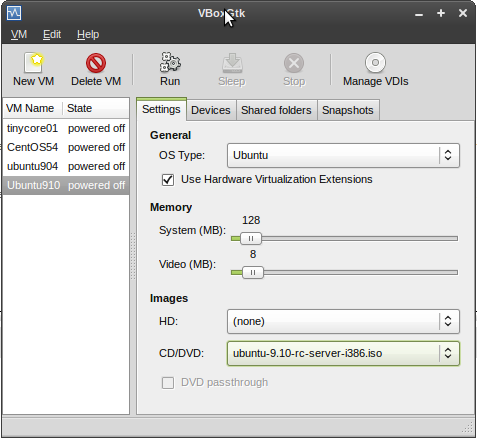
- startup vboxgtk and register the CD image (manage VDI's)
- then create a new VM, and associate it with the ISO, see
 |
- or, better, use the cmdline: VBoxManage createvm :
metskem@gneisenau ~/vbox $ VBoxManage createvm --name ubuntu910 --register --ostype Ubuntu
VirtualBox Command Line Management Interface Version 3.0.8
(C) 2005-2009 Sun Microsystems, Inc.
All rights reserved.

Virtual machine 'ubuntu910' is created and registered.
UUID: 20b27023-e054-4a0a-9080-242dff36ca4b
Settings file: '/home/metskem/.VirtualBox/Machines/ubuntu910/ubuntu910.xml'
- check your results with the VBoxManage list command :
metskem@gneisenau ~/vbox $ VBoxManage list vms
VirtualBox Command Line Management Interface Version 3.0.8
(C) 2005-2009 Sun Microsystems, Inc.
All rights reserved.

"tinycore01" {de160c79-0b97-4773-a4e1-3d4b610e3cbc}
"CentOS54" {ce515eda-41c6-494a-b5b4-3bef38e624d2}
"ubuntu904" {afa59426-fd8d-4bcf-ac4d-e5f385ffd70c}
"ubuntu910" {20b27023-e054-4a0a-9080-242dff36ca4b}
- now alter several attributes of the VM with the VBoxManage modifyvm command :
metskem@gneisenau ~/bin $ vb modifyvm ubuntu910 --memory 255 --vram 1 --pae off --hwvirtex off --boot1 dvd --boot2 disk --hda /home/metskem/.VirtualBox/HardDisks/ubuntu910.vdi --dvd /home/metskem/Downloads/ubuntu-9.10-rc-server-i386.iso --nic1 bridged --bridgeadapter1 wlan0
VirtualBox Command Line Management Interface Version 3.0.8
(C) 2005-2009 Sun Microsystems, Inc.
All rights reserved.
- main memory is 255 MB
- graphics memory 1 MB
- pae (Physical Address Extensions) off
- no hardware virtualization
- bootorder, dvd first, disk second
- attach a vdi file that we will create later
- use bridged networking (most suitable for servers)
- use the host's wlan nic as bridgeadapter
- use the DVD (we need that to boot from the first time)
- create a VDI hd with the VBoxManage createhd command :
metskem@gneisenau ~/.VirtualBox/HardDisks $ VBoxManage createhd --filename ubuntu910.vdi --size 2000 --format VDI
VirtualBox Command Line Management Interface Version 3.0.8
(C) 2005-2009 Sun Microsystems, Inc.
All rights reserved.

0%...10%...20%...30%...40%...50%...60%...70%...80%...90%...100%
Disk image created. UUID: 496dd7fd-2bdb-4255-819b-04ba90cb77ab
metskem@gneisenau ~/.VirtualBox/HardDisks $ ls -l
total 1500192
-rw------- 1 metskem metskem 1536176640 2009-10-25 13:40 hd01
-rw------- 1 metskem metskem       8704 2009-10-25 13:41 ubuntu910.vdi
Starting the VM#
- now fire up the whole thing (you can use the vboxgtk for that) but I prefer cmdline, so : VBoxManage startvm ubuntu910 (that name was given to this VM)
metskem@gneisenau ~/bin $ vb startvm ubuntu910
VirtualBox Command Line Management Interface Version 3.0.8
(C) 2005-2009 Sun Microsystems, Inc.
All rights reserved.

Waiting for the remote session to open...
Remote session has been successfully opened.
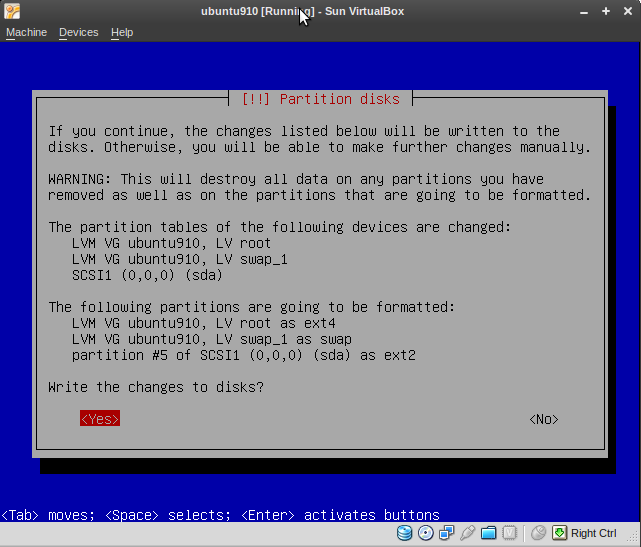
This will show a popup and you can go on:
Networking#
The manual (Chapter 6) has more information on this.
I chose bridged networking, as this is most suitable for servers. You can choose a host adapter that acts as the bridge adapter.
On the host this looks like :
metskem@gneisenau ~/bin $ ip a
1: lo: <LOOPBACK,UP,LOWER_UP> mtu 16436 qdisc noqueue state UNKNOWN
    link/loopback 00:00:00:00:00:00 brd 00:00:00:00:00:00
    inet 127.0.0.1/8 scope host lo
    inet6 ::1/128 scope host
       valid_lft forever preferred_lft forever
2: eth0: <NO-CARRIER,BROADCAST,MULTICAST,UP> mtu 1500 qdisc pfifo_fast state DOWN qlen 1000
    link/ether 00:24:81:56:01:f9 brd ff:ff:ff:ff:ff:ff
3: wmaster0: <BROADCAST,MULTICAST,UP,LOWER_UP> mtu 1500 qdisc pfifo_fast state UNKNOWN qlen 1000
    link/ieee802.11 00:22:fa:8f:fd:0a brd ff:ff:ff:ff:ff:ff
4: wlan0: <BROADCAST,MULTICAST,UP,LOWER_UP> mtu 1500 qdisc pfifo_fast state UP qlen 1000
    link/ether 00:22:fa:8f:fd:0a brd ff:ff:ff:ff:ff:ff
    inet 10.0.0.164/24 brd 10.0.0.255 scope global wlan0
    inet6 fe80::222:faff:fe8f:fd0a/64 scope link
       valid_lft forever preferred_lft forever
7: vboxnet0: <BROADCAST,MULTICAST,UP,LOWER_UP> mtu 1500 qdisc pfifo_fast state UNKNOWN qlen 1000
    link/ether 0a:00:27:00:00:00 brd ff:ff:ff:ff:ff:ff
    inet 10.0.2.2/8 brd 10.255.255.255 scope global vboxnet0
    inet6 fe80::800:27ff:fe00:0/64 scope link
       valid_lft forever preferred_lft forever
metskem@gneisenau ~/bin $ ifconfig vboxnet0
vboxnet0  Link encap:Ethernet  HWaddr 0a:00:27:00:00:00
          inet addr:10.0.2.2  Bcast:10.255.255.255  Mask:255.0.0.0
          inet6 addr: fe80::800:27ff:fe00:0/64 Scope:Link
          UP BROADCAST RUNNING MULTICAST  MTU:1500  Metric:1
          RX packets:0 errors:0 dropped:0 overruns:0 frame:0
          TX packets:292 errors:0 dropped:0 overruns:0 carrier:0
          collisions:0 txqueuelen:1000
          RX bytes:0 (0.0 B)  TX bytes:19247 (19.2 KB)

metskem@gneisenau ~/bin $ ip r
10.0.0.0/24 dev wlan0  proto kernel  scope link  src 10.0.0.164  metric 2
10.0.2.0/24 via 10.0.2.2 dev vboxnet0  scope link
10.0.2.0/24 dev vboxnet0  scope link
169.254.0.0/16 dev wlan0  scope link  metric 1000
default via 10.0.0.138 dev wlan0  proto static
On the VM (guest) it looks like this :
root@ubuntu:/etc/init.d# ip a
1: lo: <LOOPBACK,UP,LOWER_UP> mtu 16436 qdisc noqueue state UNKNOWN
    link/loopback 00:00:00:00:00:00 brd 00:00:00:00:00:00
    inet 127.0.0.1/8 scope host lo
    inet6 ::1/128 scope host
       valid_lft forever preferred_lft forever
2: eth0: <BROADCAST,MULTICAST,UP,LOWER_UP> mtu 1500 qdisc pfifo_fast state UNKNOWN qlen 1000
    link/ether 08:00:f5:1f:e9:04 brd ff:ff:ff:ff:ff:ff
    inet 10.0.0.172/24 brd 10.0.0.255 scope global eth0
    inet6 fe80::a00:f5ff:fe1f:e904/64 scope link
       valid_lft forever preferred_lft forever
root@ubuntu:/etc/init.d# ifconfig eth0
eth0      Link encap:Ethernet  HWaddr 08:00:f5:1f:e9:04
          inet addr:10.0.0.172  Bcast:10.0.0.255  Mask:255.255.255.0
          inet6 addr: fe80::a00:f5ff:fe1f:e904/64 Scope:Link
          UP BROADCAST RUNNING MULTICAST  MTU:1500  Metric:1
          RX packets:14721 errors:0 dropped:0 overruns:0 frame:0
          TX packets:14884 errors:0 dropped:0 overruns:0 carrier:0
          collisions:0 txqueuelen:1000
          RX bytes:1074906 (1.0 MB)  TX bytes:14917902 (14.9 MB)
          Interrupt:11 Base address:0xd020

root@ubuntu:/etc/init.d# ip r
10.0.0.0/24 dev eth0  proto kernel  scope link  src 10.0.0.172
default via 10.0.0.138 dev eth0  metric 100
Snapshots#
TODO..............
Management of VM's#
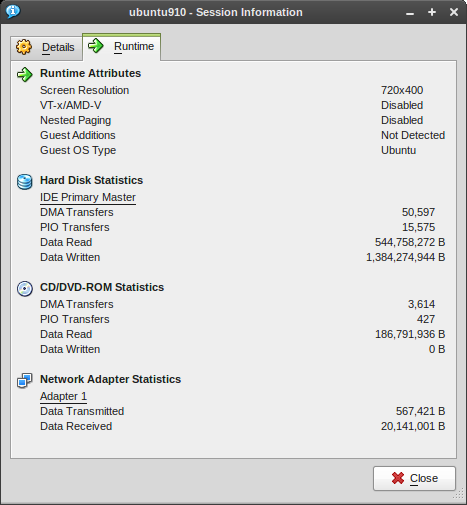
Statistics from the GUI:
Setup statistics collection#
Use the VBoxManage metrics setup command :
metskem@gneisenau ~/bin $ VBoxManage metrics setup --period 10 --samples 600 ubuntu910 CPU/Load,RAM/Usage
VirtualBox Command Line Management Interface Version 3.0.8
(C) 2005-2009 Sun Microsystems, Inc.
All rights reserved.
You can display the current collection settings with the VBoxManage metrics list _ command
metskem@gneisenau ~/bin $ vb metrics list ubuntu910
VirtualBox Command Line Management Interface Version 3.0.8
(C) 2005-2009 Sun Microsystems, Inc.
All rights reserved.

Object     Metric               Unit Minimum    Maximum    Period     Count      Description
---------- -------------------- ---- ---------- ---------- ---------- ---------- -----------
ubuntu910  CPU/Load/User        %             0     100000         10        600 Percentage of processor time spent in user mode by VM process.
ubuntu910  CPU/Load/User:avg    %             0     100000         10          1
ubuntu910  CPU/Load/User:min    %             0     100000         10          1
ubuntu910  CPU/Load/User:max    %             0     100000         10          1
ubuntu910  CPU/Load/Kernel      %             0     100000         10        600 Percentage of processor time spent in kernel mode by VM process.
ubuntu910  CPU/Load/Kernel:avg  %             0     100000         10          1
ubuntu910  CPU/Load/Kernel:min  %             0     100000         10          1
ubuntu910  CPU/Load/Kernel:max  %             0     100000         10          1
ubuntu910  RAM/Usage/Used       kB            0 2147483647         10        600 Size of resident portion of VM process in memory.
ubuntu910  RAM/Usage/Used:avg   kB            0 2147483647         10          1
ubuntu910  RAM/Usage/Used:min   kB            0 2147483647         10          1
ubuntu910  RAM/Usage/Used:max   kB            0 2147483647         10          1
Displaying statistics #
Use the VBoxManage metrics query command to display usage stats :
metskem@gneisenau ~/bin $ vb metrics query ubuntu910
VirtualBox Command Line Management Interface Version 3.0.8
(C) 2005-2009 Sun Microsystems, Inc.
All rights reserved.

Object     Metric               Values
---------- -------------------- --------------------------------------------
ubuntu910  CPU/Load/User        0.22%, 0.09%, 0.15%, 0.30%, 0.20%, 0.15%, 0.36%, 0.09%, 0.30%, 0.15%, 0.15%, 0.40%, 0.25%, 0.35%, 0.20%, 0.22%, 0.40%
ubuntu910  CPU/Load/User:avg    0.23%
ubuntu910  CPU/Load/User:min    0.09%
ubuntu910  CPU/Load/User:max    0.40%
ubuntu910  CPU/Load/Kernel      0.18%, 0.09%, 0.15%, 0.35%, 0.30%, 0.25%, 0.27%, 0.09%, 0.20%, 0.20%, 0.10%, 0.20%, 0.15%, 0.20%, 0.30%, 0.18%, 0.25%
ubuntu910  CPU/Load/Kernel:avg  0.20%
ubuntu910  CPU/Load/Kernel:min  0.09%
ubuntu910  CPU/Load/Kernel:max  0.35%
ubuntu910  RAM/Usage/Used       136452 kB, 136452 kB, 136452 kB, 136452 kB, 136452 kB, 136452 kB, 136452 kB, 136452 kB, 136452 kB, 136452 kB, 136452 kB, 136452 kB, 136452 kB, 136452 kB, 136452 kB, 136452 kB, 136452 kB
ubuntu910  RAM/Usage/Used:avg   136452 kB
ubuntu910  RAM/Usage/Used:min   136452 kB
ubuntu910  RAM/Usage/Used:max   136452 kB
Mass VM creation#
Preparing original mother system#
I created a fairly small Linux image with a DSL (Damn Small Linux) distro.
This guy runs with only 24M RAM.
The following was done to create this one :
- download iso image
- vb createvm --name dsl01 --register --ostype Linux
- vb createhd --filename HardDisks/dsl01disk.vdi --size 250 --format VDI
- vb modifyvm dsl01 --memory 24 --vram 1 --pae off --hwvirtex off --boot1 dvd --boot2 disk --hda HardDisks/dsl01disk.vdi --dvd /home/metskem/Downloads/dsl.iso --nic1 bridged --bridgeadapter1 wlan0
- give the VM a name that can be queried by the guest: vb guestproperty set dsl01 vmname dsl01 -flags RDONLYGUEST
- TODO to use this name in the guest, you first have to install the guest additions, see Chapter 4.3.1 Installing the Linux Guest Additions
- start the vm with vb startvm dsl01
- make sure the ssh daemon is started during boot so we can remote login, create symlink in /etc/rc5.d: S25ssh -> ../init.d/ssh
- set password for user dsl
- create the following script and create symlink in /etc/rc5.d: S22tellip -> ../init.d/tellip.sh :
IP=`ifconfig eth0|grep inet|awk '{ print $2}'|awk -F: '{print $2}'`
wget -q -O - http://www.computerhok.nl/IAM:$IP
Cloning #
Now I want to clone this and create a whole lot of them (in a script). The following actions the have to be done (XX = sequencenumber) :
- vb clonehd HardDisks/dsl01disk.vdi HardDisks/dslXXdisk.vdi --remember
- vb createvm --name dslXX --register --ostype Linux
- vb modifyvm dslXX --memory 24 --vram 1 --pae off --hwvirtex off --boot1 disk --hda HardDisks/dslXXdisk.vdi --nic1 bridged --bridgeadapter1 wlan0
See the following simple script :
#!/bin/sh
#
#  script to generate VBoxManage VMs
#
NUMVMS=$1
for N in `seq 2 $NUMVMS`
do
  echo "Creating VM $N"
  VBoxManage clonehd HardDisks/dsl01disk.vdi HardDisks/dsl${N}disk.vdi --remember
  VBoxManage createvm --name dsl$N --register --ostype Linux
  VBoxManage modifyvm dsl$N --memory 24 --vram 1 --pae off --hwvirtex off --boot1 disk --hda HardDisks/dsl${N}disk.vdi --nic1 bridged --bridgeadapter1 wlan0
done
echo ""
echo "VirtualBox's known VMs :"
echo " -------------------------------------------------------------"
VBoxManage list vms
echo ""
echo ""
echo "VirtualBox's known HDDs :"
echo " -------------------------------------------------------------"
VBoxManage list hdds
Nice and Handy to know#
- Use 'Right Ctrl' (the host key) key to capture the mouse/keyboard again
- show VM info with VBoxManage showvminfo <vmname>