Tomcat 7#
Resources#
- Tomcat HOME

- Tomcat config ref
- WTP_Tomcat_FAQ
- A very simple Tomcat WebSphere comparison
- Tomcat wiki
- ASF Bugzilla
Tomcat upgrade to release 7.0.0.2#
Let's play a bit with Tomcat 7 and see if my apps are still working......
Download#
Download the usual way from http://tomcat.apache.org/download-70.cgi
Split manager role#
If you are using conf/tomcat-users.xml, then split up the manager role in 4 roles:
.....
  <role rolename="manager"/>
  <role rolename="manager-gui"/>
  <role rolename="manager-script"/>
  <role rolename="manager-jmx"/>
  <role rolename="manager-status"/>
....
lib directory#
new are:
- ecj-3.6.jar (we use the Eclipse JDT compiler for JSP compilation, so we no longer require a full JDK, but a JRE insteed)
- tomcat-api.jar ((Interfaces shared by Catalina and Jasper)) :
metskem@gneisenau:/usr/local/tomcat/lib$ jar -tf tomcat-api.jar
META-INF/
META-INF/MANIFEST.MF
org/
org/apache/
org/apache/tomcat/
org/apache/tomcat/buildutil/
org/apache/tomcat/jni/
org/apache/tomcat/util/
org/apache/tomcat/InstanceManager.class
org/apache/tomcat/JarScanner.class
org/apache/tomcat/JarScannerCallback.class
org/apache/tomcat/PeriodicEventListener.class
META-INF/NOTICE
META-INF/LICENSE
We don't copy the old mysql-connector-java-5.1.7-bin.jar, but download a fresh mysql-connector-java-5.1.13-bin.jar from http://dev.mysql.com/ to the lib directory.
config#
- (if necessary) create keystore : keytool -genkey -alias tomcat -keystore keystore.jks
- Update server.xml with ssl, add keystoreFile="${catalina.home}/conf/keystore" keystorePass="password" to ssl connector.
- Update server.xml with prefix="access." suffix=".log" pattern="common"
- Update server.xml with URIEncoding="UTF-8"
- Update context.xml, uncomment manager pathname... to disable session persistence
- Copy conf/keystore from old tomcat version (this has the SSL certificate we need for the https connector)
Starting up#
First remove *.bat from the bin directory (we don't need these for sure on linux).
The fire up the bin/startup.sh :
metskem@gneisenau:/usr/local/tomcat/bin$ ./startup.sh
Using CATALINA_BASE:   /usr/local/tomcat
Using CATALINA_HOME:   /usr/local/tomcat
Using CATALINA_TMPDIR: /usr/local/tomcat/temp
Using JRE_HOME:        /usr
Using CLASSPATH:       /usr/local/tomcat/bin/bootstrap.jar:/usr/local/tomcat/bin/tomcat-juli.jar
metskem@gneisenau:/usr/local/tomcat/bin$ Oct 8, 2010 3:30:29 PM org.apache.catalina.core.AprLifecycleListener init
INFO: The APR based Apache Tomcat Native library which allows optimal performance in production environments was not found on the java.library.path: /usr/lib/jvm/java-6-sun-1.6.0.20/jre/lib/i386/server:/usr/lib/jvm/java-6-sun-1.6.0.20/jre/lib/i386:/usr/lib/jvm/java-6-sun-1.6.0.20/jre/../lib/i386:/usr/java/packages/lib/i386:/lib:/usr/lib
Oct 8, 2010 3:30:29 PM org.apache.coyote.http11.Http11Protocol init
INFO: Initializing Coyote HTTP/1.1 on http-8080
Oct 8, 2010 3:30:29 PM org.apache.coyote.ajp.AjpProtocol init
INFO: Initializing Coyote AJP/1.3 on ajp-8009
Oct 8, 2010 3:30:29 PM org.apache.catalina.startup.Catalina load
INFO: Initialization processed in 737 ms
Oct 8, 2010 3:30:29 PM org.apache.catalina.core.StandardService startInternal
INFO: Starting service Catalina
Oct 8, 2010 3:30:29 PM org.apache.catalina.core.StandardEngine startInternal
INFO: Starting Servlet Engine: Apache Tomcat/7.0.2
Oct 8, 2010 3:30:29 PM org.apache.catalina.startup.HostConfig deployDirectory
INFO: Deploying web application directory host-manager
Oct 8, 2010 3:30:30 PM org.apache.catalina.startup.HostConfig deployDirectory
INFO: Deploying web application directory manager
Oct 8, 2010 3:30:30 PM org.apache.catalina.startup.HostConfig deployDirectory
INFO: Deploying web application directory examples
Oct 8, 2010 3:30:30 PM org.apache.catalina.startup.HostConfig deployDirectory
INFO: Deploying web application directory docs
Oct 8, 2010 3:30:30 PM org.apache.catalina.startup.HostConfig deployDirectory
INFO: Deploying web application directory ROOT
Oct 8, 2010 3:30:30 PM org.apache.coyote.http11.Http11Protocol start
INFO: Starting Coyote HTTP/1.1 on http-8080
Oct 8, 2010 3:30:30 PM org.apache.coyote.ajp.AjpProtocol start
INFO: Starting Coyote AJP/1.3 on ajp-8009
Oct 8, 2010 3:30:30 PM org.apache.catalina.startup.Catalina start
INFO: Server startup in 887 ms
Nice !
Configuring Tomcat in Eclipse#
SSL and users/roles#
See the WTP_Tomcat_FAQ
Open the server config and "Open launch configuration" :
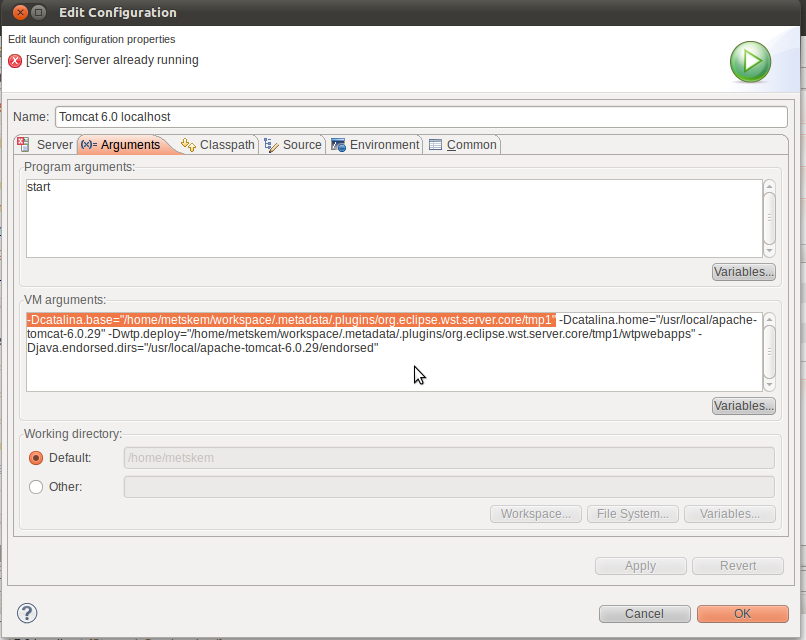
Pick up the CATALINA_HOME and modify the server.xml there with something like :
<Connector port="8443" protocol="HTTP/1.1" SSLEnabled="true"
   maxThreads="150" scheme="https" secure="true" URIEncoding="UTF-8"
   clientAuth="false" sslProtocol="TLS"
   keystoreFile="${catalina.home}/conf/keystore.jks" keystorePass="tomcat"/>
In the same location you can change your tomcat-users.xml !
Tomcat JDBCRealm#
Store your userids, passwords and roles in an SQL database.
See the tomcat docs for all reference information.
Create the database and tables#
create database tomcatuserDB;

create user 'tomcatuser'@'localhost' identified by "tomcatpassword";

use tomcatuserDB;

create table users (
  user_name         varchar(15) not null primary key,
  user_pass         varchar(15) not null
);

create table user_roles (
  user_name         varchar(15) not null,
  role_name         varchar(15) not null,
  primary key (user_name, role_name)
);

grant all privileges on tomcatuserDB.* to 'tomcatuser'@'localhost';
Now we have to insert a user/password, but we want to use digested passwords. Therefore we first have to generate an (md5) generated password (testpassword)(:
metskem@gneisenau:/usr/local/tomcat/lib$ java -cp catalina.jar:../bin/tomcat-juli.jar:tomcat-util.jar org.apache.catalina.realm.RealmBase -a md5 -e utf-8 testpassword
testpassword:e16b2ab8d12314bf4efbd6203906ea6c
Then insert the row, and also insert a role row :
insert into users(user_name,user_pass) values('testuser','e16b2ab8d12314bf4efbd6203906ea6c');
insert into user_roles(user_name,role_name) values('testuser','manager-gui');
Setup Realm in server.xml#
The following is added to conf/server.xml :
<Realm className="org.apache.catalina.realm.LockOutRealm">
<Realm className="org.apache.catalina.realm.JDBCRealm"
driverName="com.mysql.jdbc.Driver"
connectionURL="jdbc:mysql://localhost/tomcatuserDB?user=tomcatuser&password=tomcatpassword"
userTable="users" userNameCol="user_name" userCredCol="user_pass"
userRoleTable="user_roles" roleNameCol="role_name"/>
</Realm>
