Synology#
A Synology DS212J (an oldie) with 2 1TB disks borrowed from Rien.
Booted, lives at 192.168.2.35, web interface @ https://192.168.2.35:5001
Factory Reset done.
You then need the Synology Assistant to reinstall it, which can be downloaded from the Synology Download Center.
I also took DSM 6.2.4 (the actual OS) from there. Synology Assistant was installed on Mac.
The assistant scans the network for Synology devices (I did have to turn on the Allow compatibility with device that do not support password encryption.
The installation process takes about 10 mins, then web console is @ http://192.168.2.35:5000/
First install steps#
Once the Assistant is finished, you go to web console and login with the (admin) user you configured in Assistant.
- skip the QuickConnect
- The device can also be found using https://finds.synology.com/#
- Disable the admin account (after creating a second account with admin privileges)
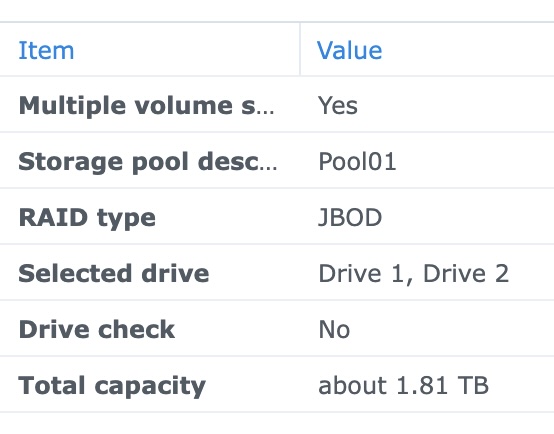
- Create the following pool:
 |
- create 1 1 TB volume (vol01)
- create group "domhofjes" with a (test) quota of 20 MB
- create account esther, member of domhofjes
- install Synology Photos app on iPhone, but it complains that Synology Photos is not installed on server.
- login to our Synology server
- install "Photo Station" on Synology server, but that didn't help, and the Synology Photos package required at least DSM 7.x :-(, also see the download center
- Same story is true for Synology Drive, also requires 7.x
- You can install the DS file and DS photo apps though, it looks like the second one requires Photo Station on the server
- Disable SMB service
- Disable AFP service
- Disable Bonjour service
- Enable firewall, add custom profile allowing regions NL, BE, DE, CH and IT, and 192.168.0.0/16, deny by default
- Enable Auto Block, and enable Auto Block Expiration after 1 day.
- Set up email notification using Gmail (Synology is now allowed to access my gmail public info)
