Maven#
Table of Contents
Resources#
- Home

- Dependency mechanism
- Plugins
- pom reference
- maven repository for searching dependency defs :-)
- How_to_find_dependencies
- Maven Eclipse integration
Eclipse integration#
I installed the Eclipse QE plugin by adding http://q4e.googlecode.com/svn/trunk/updatesite-iam/ to the list of software sites and check the Core features plus the Eclipse IAM editor
Better: the m2 maven eclipse integration plugin from http://m2eclipse.sonatype.org/sites/m2e .
And also the m2e wtp integration from http://m2eclipse.sonatype.org/sites/m2e-extras/
Some problems with Eclipse Helios to integrate Eclipse with maven (I want the maven dependencies to be on the webapps classpath when running them in tomcat from within eclipse).
Steps :
- Create new Dynamic Web Project
- Right-click project => Maven => Enable Dependencies
- Right-click project => Properties => Deployment Assembly => Add Java Build libraries => Maven classpath container
Create maven project
By hand it can be done with :
mvn archetype:generate -DgroupId=com.mycompany.app -DartifactId=my-app -DarchetypeArtifactId=maven-archetype-quickstart -DinteractiveMode=false
Of use Eclipse New Project....
Dependencies#
I have a dependency on x.y.z., how do I know the artifactid, groupID and version of it ?
A very brute way would be to search for pom files in the repository :
metskem@gneisenau:~$ find .m2/repository/ -name *.pom|wc
    384     384   32808
In a pom file you will find what you need :
<project>
  <modelVersion>4.0.0</modelVersion>
  <groupId>commons-lang</groupId>
  <artifactId>commons-lang</artifactId>
  <name>Lang</name>
  <version>2.1</version>
  <description>Commons.Lang, a package of Java utility classes for the
    classes that are in java.lang's hierarchy, or are considered to be so
    standard as to justify existence in java.lang.</description>
  <url>http://jakarta.apache.org/commons/${pom.artifactId.substring(8)}/</url>
  <issueManagement>
................
Create repository entry#
I have a project that requires WebSphere jars for compile, how do I arrange that with maven dependencies, I could not find a dependency for that (of course).
You can make it yourself with the install plugin :
metskem@gneisenau:~$ mvn install:install-file -Dfile=/home/metskem/java_libs/com.ibm.ws.admin.client_7.0.0.jar -DgroupId=com.ibm.websphere \
-DartifactId=admin.client -Dversion=7.0.0 -Dpackaging=jar -DgeneratePom=true
[INFO] Scanning for projects...
[INFO] Searching repository for plugin with prefix: 'install'.
[INFO] ------------------------------------------------------------------------
[INFO] Building my-app
[INFO]    task-segment: [install:install-file] (aggregator-style)
[INFO] ------------------------------------------------------------------------
[INFO] [install:install-file {execution: default-cli}]
[INFO] Installing /home/metskem/java_libs/com.ibm.ws.admin.client_7.0.0.jar to /home/metskem/.m2/repository/com/ibm/websphere/admin.client/7.0.0/admin.client-7.0.0.jar
[INFO] ------------------------------------------------------------------------
[INFO] BUILD SUCCESSFUL
[INFO] ------------------------------------------------------------------------
[INFO] Total time: 1 second
[INFO] Finished at: Sat Oct 02 13:26:08 CEST 2010
[INFO] Final Memory: 4M/52M
[INFO] ------------------------------------------------------------------------
The same was done for stripesstuff :
war plugin#
If you want a war file to be generated by maven, you need the (default supplied) war plugin.
I had to add the webXml and containerConfigXML attributes to specify the location of the web.xml and context.xml (Tomcat) file, and also the warName attribute, this can be done in the pom.xml, see the following snippet:
      <plugin>
      	<groupId>org.apache.maven.plugins</groupId>
      	<artifactId>maven-war-plugin</artifactId>
      	<version>2.0</version>
      	<extensions>false</extensions>
      	<inherited>true</inherited>
      	<configuration>
      	  <webXml>WebContent/WEB-INF/web.xml</webXml>
      	  <containerConfigXML>WebContent/META-INF/context.xml</containerConfigXML>
      	  <warName>WebTest</warName>
      	</configuration>
      </plugin>
The war file then contains the following :
metskem@gneisenau:~/workspace/WebTest$ mvn war:war
[INFO] Scanning for projects...
[INFO] ------------------------------------------------------------------------
[INFO] Building WebTest
[INFO]    task-segment: [war:war]
[INFO] ------------------------------------------------------------------------
[INFO] [war:war {execution: default-cli}]
[INFO] Exploding webapp...
[INFO] Copy webapp webResources to /home/metskem/workspace/WebTest/target/WebTest-1.0-SNAPSHOT
[INFO] Assembling webapp WebTest in /home/metskem/workspace/WebTest/target/WebTest-1.0-SNAPSHOT
[INFO] Generating war /home/metskem/workspace/WebTest/target/WebTest-1.0-SNAPSHOT.war
[INFO] Building war: /home/metskem/workspace/WebTest/target/WebTest-1.0-SNAPSHOT.war
[INFO] ------------------------------------------------------------------------
[INFO] BUILD SUCCESSFUL
[INFO] ------------------------------------------------------------------------
[INFO] Total time: 1 second
[INFO] Finished at: Sat Oct 02 14:35:42 CEST 2010
[INFO] Final Memory: 4M/53M
[INFO] ------------------------------------------------------------------------
metskem@gneisenau:~/workspace/WebTest$ jar -tf target/WebTest-1.0-SNAPSHOT.war
META-INF/
META-INF/MANIFEST.MF
WEB-INF/
WEB-INF/lib/
WEB-INF/classes/
WEB-INF/classes/nl/
WEB-INF/classes/nl/rabobank/
WEB-INF/classes/nl/rabobank/hdw/
WEB-INF/classes/nl/rabobank/hdw/util/
WEB-INF/classes/nl/rabobank/hdw/servlets/
META-INF/context.xml
WEB-INF/lib/commons-logging-1.1.jar
WEB-INF/lib/log4j-1.2.12.jar
WEB-INF/lib/avalon-framework-4.1.3.jar
WEB-INF/lib/logkit-1.0.1.jar
WEB-INF/classes/.mavenResources.target.classes
WEB-INF/classes/nl/rabobank/hdw/util/RaboURLReader.class
WEB-INF/classes/nl/rabobank/hdw/util/Util.class
WEB-INF/classes/nl/rabobank/hdw/util/RaboRasMessage.class
WEB-INF/classes/nl/rabobank/hdw/servlets/LogTestServlet.class
WEB-INF/classes/nl/rabobank/hdw/servlets/SSLTestServlet.class
WEB-INF/classes/nl/rabobank/hdw/servlets/IvpServlet.class
WEB-INF/web.xml
META-INF/maven/
META-INF/maven/computerhok.nl/
META-INF/maven/computerhok.nl/WebTest/
META-INF/maven/computerhok.nl/WebTest/pom.xml
META-INF/maven/computerhok.nl/WebTest/pom.properties
JAR Bloat ?!#
It appears that maven dependency includes more jars than when you build your war the traditional way (manually importing jars into WEB-INF/lib, only those you need).
See the following differences :
traditional way
tomcat@kruimelhost:/usr/local/tomcat/webapps$ jar -tf krm2.war |grep lib|sort
WEB-INF/jsp/taglibs.jsp
WEB-INF/lib/
WEB-INF/lib/commons-beanutils-1.8.2.jar
WEB-INF/lib/commons-collections-3.2.1.jar
WEB-INF/lib/commons-lang-2.3.jar
WEB-INF/lib/commons-logging-1.1.1.jar
WEB-INF/lib/displaytag-1.2.jar
WEB-INF/lib/itext-1.3.jar
WEB-INF/lib/log4j-1.2.16.jar
WEB-INF/lib/mail.jar
WEB-INF/lib/stripes.jar
WEB-INF/lib/stripesstuff-0.2.jar
maven way
metskem@gneisenau:~/workspace/krm2$ jar -tf target/krm2.war |grep lib|sort
WEB-INF/lib/
WEB-INF/lib/activation-1.1.jar
WEB-INF/lib/commons-beanutils-1.7.0.jar
WEB-INF/lib/commons-collections-3.1.jar
WEB-INF/lib/commons-lang-2.4.jar
WEB-INF/lib/commons-logging-1.0.jar
WEB-INF/lib/displaytag-1.2.jar
WEB-INF/lib/itext-1.3.jar
WEB-INF/lib/jcl104-over-slf4j-1.4.2.jar
WEB-INF/lib/log4j-1.2.12.jar
WEB-INF/lib/mail-1.4.jar
WEB-INF/lib/slf4j-api-1.4.2.jar
WEB-INF/lib/slf4j-log4j12-1.4.2.jar
WEB-INF/lib/stripes-1.5.2.jar
WEB-INF/lib/stripesstuff-0.2.jar
It does appear that switching to lower versions of dependencies, you get less jars that are required.
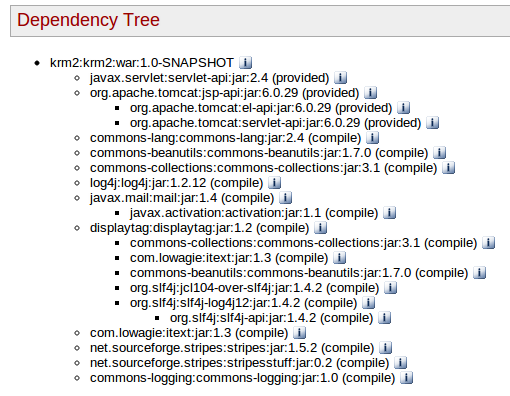
At least you can now see the dependency tree :