lxc#
Table of Contents
- lxc
- Resources
- Install and setup
- Creating your first container
- Create container on it's own lv.
- Operating the container
- Show what is running
- Check config for a container
- Starting the container
- Stopping the container
- Cloning the container
- Destroying a container
- control groups
- Networking
- Remote "copying" containers.
Linux containers is a kernel based lightweight virtual system mechanism sometimes described as “chroot on steroids”.
It is part of the mainstream kernel, and is based on kernel cgroups.
Resources#

Install and setup#
First install the package lxc. This will introduce some new directories and files :
- /etc/lxc/lxc.conf - the main configuration file for lxc
- /etc/init/lxc.conf - two upstart scripts
- /usr/lib/lxc/templates - contains the `templates' which can be used to create new containers.
- /var/lib/lxc - is where containers and their configuration information are stored.
- /var/cache/lxc - is where caches of distribution data are stored to speed up multiple container creations.
Creating your first container#
Well, this is very simple :
lxc-create -t ubuntu -n ubuntu1
A new directory is created and has contents for a minimal ubuntu system:
athena ~ # ls -l /var/lib/lxc/ubuntu1/
total 12
-rw-r--r--  1 root root 1304 Feb  3 17:35 config
-rw-r--r--  1 root root  110 Feb  3 15:17 fstab
drwxr-xr-x 21 root root 4096 Feb  4 20:55 rootfs
-rw-------  1 root root    0 Feb  3 15:17 rootfs.hold
athena ~ # ls -l /var/lib/lxc/ubuntu1/rootfs
total 76
drwxr-xr-x  2 root root 4096 Feb  3 15:17 bin
drwxr-xr-x  2 root root 4096 Apr 19  2012 boot
drwxr-xr-x  8 root root 4096 Feb  4 20:55 dev
drwxr-xr-x 62 root root 4096 Feb  4 20:55 etc
drwxr-xr-x  3 root root 4096 Feb  3 15:17 home
drwxr-xr-x 12 root root 4096 Feb  3 15:16 lib
drwxr-xr-x  2 root root 4096 Feb  3 15:14 media
drwxr-xr-x  2 root root 4096 Apr 19  2012 mnt
drwxr-xr-x  2 root root 4096 Feb  3 15:14 opt
drwxr-xr-x  2 root root 4096 Apr 19  2012 proc
drwx------  2 root root 4096 Feb  3 18:43 root
drwxr-xr-x  6 root root 4096 Feb  3 15:17 run
drwxr-xr-x  2 root root 4096 Feb  3 15:17 sbin
drwxr-xr-x  2 root root 4096 Mar  5  2012 selinux
drwxr-xr-x  2 root root 4096 Feb  3 15:14 srv
drwxr-xr-x  2 root root 4096 Apr 14  2012 sys
drwxrwxrwt  2 root root 4096 Feb  4 21:17 tmp
drwxr-xr-x 10 root root 4096 Feb  3 15:14 usr
drwxr-xr-x 11 root root 4096 Feb  3 18:52 var
Create container on it's own lv.#
root@apollo# lxc-create -t ubuntu -n cn3 -B lvm --vgname vg0 --fstype ext4
No config file specified, using the default config
  Logical volume "cn3" created
mke2fs 1.42 (29-Nov-2011)
Filesystem label=
OS type: Linux
Block size=4096 (log=2)
Fragment size=4096 (log=2)
Stride=0 blocks, Stripe width=0 blocks
65536 inodes, 262144 blocks
13107 blocks (5.00%) reserved for the super user
First data block=0
Maximum filesystem blocks=268435456
8 block groups
32768 blocks per group, 32768 fragments per group
8192 inodes per group
Superblock backups stored on blocks:
	32768, 98304, 163840, 229376

Allocating group tables: done
Writing inode tables: done
Creating journal (8192 blocks): done
Writing superblocks and filesystem accounting information: done

debootstrap is /usr/sbin/debootstrap
Checking cache download in /var/cache/lxc/precise/rootfs-i386 ...
Copy /var/cache/lxc/precise/rootfs-i386 to /var/lib/lxc/cn3/rootfs ...
Copying rootfs to /var/lib/lxc/cn3/rootfs ...

##
# The default user is 'ubuntu' with password 'ubuntu'!
# Use the 'sudo' command to run tasks as root in the container.
##

'ubuntu' template installed
Unmounting LVM
'cn3' created
Operating the container#
Show what is running#
athena ~ # lxc-list
RUNNING

FROZEN

STOPPED
  ubuntu1
And (after starting a conainer) :
athena ~ # lxc-info -n ubuntu1
state:   RUNNING
pid:     12945
Check config for a container#
athena ubuntu1 # CONFIG=/var/lib/lxc/ubuntu1/config lxc-checkconfig
--- Namespaces ---
Namespaces: required
Utsname namespace: missing
Ipc namespace: required
Pid namespace: required
User namespace: missing
Network namespace: missing
Multiple /dev/pts instances: missing

--- Control groups ---
Cgroup: required
Cgroup clone_children flag: enabled
Cgroup device: missing
Cgroup sched: missing
Cgroup cpu account: missing
Cgroup memory controller: missing

--- Misc ---
Veth pair device: missing
Macvlan: missing
Vlan: missing
File capabilities:
Note : Before booting a new kernel, you can check its configuration
usage : CONFIG=/path/to/config /usr/bin/lxc-checkconfig
Starting the container#
athena ~ # lxc-start -n ubuntu1 -d
The -d option is for daemonize. If you omit this option you get a console
You can also grab a console afterwards
lxc-console -n ubuntu1(press <Ctrl-a q> to quit the console).
Stopping the container#
You can, of course, shutdown the container itself when you are logged by issuing the shutdown command.
From the host you can issue:
lxc-shutdown -n ubuntu1
Cloning the container #
Cloning container ubuntu1 to ubuntu2 :
athena ~ # lxc-clone -o ubuntu1 -n ubuntu2
Tweaking configuration
Copying rootfs...
Updating rootfs...
'ubuntu2' created
Destroying a container#
athena ~ # lxc-destroy -n ubuntu2
Container ubuntu2 is running, aborting the deletion.
athena ~ # lxc-destroy -n ubuntu2 -f
athena ~ # lxc-list
RUNNING
  ubuntu1

FROZEN

STOPPED
control groups#
The lxc-cgroup allows you to set controls (constraints) on the container.
From the man page:
DESCRIPTION
       lxc-cgroup  get  or set value from the control group associated with the container name.
       If no [value] is specified, the value of the subsystem is displayed, otherwise it is set.
       The lxc-cgroup does not assume the correctness of the  subsystem name, it is up to the user to specify
       the right subsystem name.
A few examples :
- show cpus:
athena ~ # lxc-cgroup -n ubuntu1 cpuset.cpu_exclusive
0
athena ~ # lxc-cgroup -n ubuntu1 cpuset.cpus
0
- show used cpu :
athena cgroup # lxc-cgroup -n ubuntu1 cpuacct.stat
user 470
system 1270
or ? :
athena cgroup # lxc-cgroup -n ubuntu1 cpuacct.usage
23134830244
- show mem stats:
athena cgroup # lxc-cgroup -n ubuntu1 memory.stat
cache 172032
rss 5939200
mapped_file 4096
swap 0
pgpgin 988910
pgpgout 987418
pgfault 5185026
pgmajfault 0
inactive_anon 868352
active_anon 5120000
inactive_file 114688
active_file 8192
unevictable 0
hierarchical_memory_limit 9223372036854775807
hierarchical_memsw_limit 9223372036854775807
total_cache 172032
total_rss 5939200
total_mapped_file 4096
total_swap 0
total_pgpgin 988910
total_pgpgout 987418
total_pgfault 5185026
total_pgmajfault 0
total_inactive_anon 868352
total_active_anon 5120000
total_inactive_file 114688
total_active_file 8192
total_unevictable 0
thena cgroup # lxc-cgroup -n ubuntu1 memory.soft_limit_in_bytes
9223372036854775807
athena cgroup # lxc-cgroup -n ubuntu1 memory.limit_in_bytes
9223372036854775807
athena cgroup # lxc-cgroup -n ubuntu1 memory.limit_in_bytes 100000000
athena cgroup # lxc-cgroup -n ubuntu1 memory.limit_in_bytes
100003840
athena cgroup # lxc-cgroup -n ubuntu1 memory.limit_in_bytes 10000000
athena cgroup # lxc-cgroup -n ubuntu1 memory.usage_in_bytes
6164480
athena cgroup # lxc-cgroup -n ubuntu1 memory.max_usage_in_bytes
6340608
- limit/show blkio read bytes per second:
athena ~ # lxc-cgroup -n ubuntu1 blkio.throttle.read_bps_device "8:0 10000000"
athena ~ # lxc-cgroup -n ubuntu1 blkio.throttle.read_bps_device
8:0 10000000
The funny thing is that you can set these things on the fly. So for example try to do a ls -l / while logged in the container, and the set the blkio.throttle.read_bps_device to something like 1000, you immediately see the thing slowing down dramatically.
You can see the available subsystem in /sys/fs/cgroup filesystem :
athena cgroup # find .|grep lxc/ubuntu1
./perf_event/lxc/ubuntu1
./perf_event/lxc/ubuntu1/cgroup.clone_children
./perf_event/lxc/ubuntu1/cgroup.event_control
./perf_event/lxc/ubuntu1/notify_on_release
./perf_event/lxc/ubuntu1/cgroup.procs
./perf_event/lxc/ubuntu1/tasks
./blkio/lxc/ubuntu1
./blkio/lxc/ubuntu1/blkio.io_queued
./blkio/lxc/ubuntu1/blkio.io_merged
./blkio/lxc/ubuntu1/blkio.io_wait_time
./blkio/lxc/ubuntu1/blkio.io_service_time
./blkio/lxc/ubuntu1/blkio.io_serviced
./blkio/lxc/ubuntu1/blkio.io_service_bytes
./blkio/lxc/ubuntu1/blkio.sectors
./blkio/lxc/ubuntu1/blkio.time
./blkio/lxc/ubuntu1/blkio.weight
./blkio/lxc/ubuntu1/blkio.weight_device
./blkio/lxc/ubuntu1/blkio.throttle.io_serviced
./blkio/lxc/ubuntu1/blkio.throttle.io_service_bytes
./blkio/lxc/ubuntu1/blkio.throttle.write_iops_device
./blkio/lxc/ubuntu1/blkio.throttle.read_iops_device
./blkio/lxc/ubuntu1/blkio.throttle.write_bps_device
./blkio/lxc/ubuntu1/blkio.throttle.read_bps_device
./blkio/lxc/ubuntu1/blkio.reset_stats
./blkio/lxc/ubuntu1/cgroup.clone_children
./blkio/lxc/ubuntu1/cgroup.event_control
./blkio/lxc/ubuntu1/notify_on_release
./blkio/lxc/ubuntu1/cgroup.procs
./blkio/lxc/ubuntu1/tasks
./freezer/lxc/ubuntu1
./freezer/lxc/ubuntu1/freezer.state
./freezer/lxc/ubuntu1/cgroup.clone_children
./freezer/lxc/ubuntu1/cgroup.event_control
./freezer/lxc/ubuntu1/notify_on_release
./freezer/lxc/ubuntu1/cgroup.procs
./freezer/lxc/ubuntu1/tasks
./devices/lxc/ubuntu1
./devices/lxc/ubuntu1/devices.list
./devices/lxc/ubuntu1/devices.deny
./devices/lxc/ubuntu1/devices.allow
./devices/lxc/ubuntu1/cgroup.clone_children
./devices/lxc/ubuntu1/cgroup.event_control
./devices/lxc/ubuntu1/notify_on_release
./devices/lxc/ubuntu1/cgroup.procs
./devices/lxc/ubuntu1/tasks
./memory/lxc/ubuntu1
./memory/lxc/ubuntu1/memory.memsw.failcnt
./memory/lxc/ubuntu1/memory.memsw.limit_in_bytes
./memory/lxc/ubuntu1/memory.memsw.max_usage_in_bytes
./memory/lxc/ubuntu1/memory.memsw.usage_in_bytes
./memory/lxc/ubuntu1/memory.oom_control
./memory/lxc/ubuntu1/memory.move_charge_at_immigrate
./memory/lxc/ubuntu1/memory.swappiness
./memory/lxc/ubuntu1/memory.use_hierarchy
./memory/lxc/ubuntu1/memory.force_empty
./memory/lxc/ubuntu1/memory.stat
./memory/lxc/ubuntu1/memory.failcnt
./memory/lxc/ubuntu1/memory.soft_limit_in_bytes
./memory/lxc/ubuntu1/memory.limit_in_bytes
./memory/lxc/ubuntu1/memory.max_usage_in_bytes
./memory/lxc/ubuntu1/memory.usage_in_bytes
./memory/lxc/ubuntu1/cgroup.clone_children
./memory/lxc/ubuntu1/cgroup.event_control
./memory/lxc/ubuntu1/notify_on_release
./memory/lxc/ubuntu1/cgroup.procs
./memory/lxc/ubuntu1/tasks
./cpuacct/lxc/ubuntu1
./cpuacct/lxc/ubuntu1/cpuacct.stat
./cpuacct/lxc/ubuntu1/cpuacct.usage_percpu
./cpuacct/lxc/ubuntu1/cpuacct.usage
./cpuacct/lxc/ubuntu1/cgroup.clone_children
./cpuacct/lxc/ubuntu1/cgroup.event_control
./cpuacct/lxc/ubuntu1/notify_on_release
./cpuacct/lxc/ubuntu1/cgroup.procs
./cpuacct/lxc/ubuntu1/tasks
./cpu/lxc/ubuntu1
./cpu/lxc/ubuntu1/cpu.rt_period_us
./cpu/lxc/ubuntu1/cpu.rt_runtime_us
./cpu/lxc/ubuntu1/cpu.stat
./cpu/lxc/ubuntu1/cpu.cfs_period_us
./cpu/lxc/ubuntu1/cpu.cfs_quota_us
./cpu/lxc/ubuntu1/cpu.shares
./cpu/lxc/ubuntu1/cgroup.clone_children
./cpu/lxc/ubuntu1/cgroup.event_control
./cpu/lxc/ubuntu1/notify_on_release
./cpu/lxc/ubuntu1/cgroup.procs
./cpu/lxc/ubuntu1/tasks
./cpuset/lxc/ubuntu1
./cpuset/lxc/ubuntu1/cpuset.memory_spread_slab
./cpuset/lxc/ubuntu1/cpuset.memory_spread_page
./cpuset/lxc/ubuntu1/cpuset.memory_pressure
./cpuset/lxc/ubuntu1/cpuset.memory_migrate
./cpuset/lxc/ubuntu1/cpuset.sched_relax_domain_level
./cpuset/lxc/ubuntu1/cpuset.sched_load_balance
./cpuset/lxc/ubuntu1/cpuset.mem_hardwall
./cpuset/lxc/ubuntu1/cpuset.mem_exclusive
./cpuset/lxc/ubuntu1/cpuset.cpu_exclusive
./cpuset/lxc/ubuntu1/cpuset.mems
./cpuset/lxc/ubuntu1/cpuset.cpus
./cpuset/lxc/ubuntu1/cgroup.clone_children
./cpuset/lxc/ubuntu1/cgroup.event_control
./cpuset/lxc/ubuntu1/notify_on_release
./cpuset/lxc/ubuntu1/cgroup.procs
./cpuset/lxc/ubuntu1/tasks
Networking#
A virtual bridge is used for networking :
athena ~ # ifconfig
eth0      Link encap:Ethernet  HWaddr e8:03:9a:e8:75:86
          UP BROADCAST MULTICAST  MTU:1500  Metric:1
          RX packets:0 errors:0 dropped:0 overruns:0 frame:0
          TX packets:0 errors:0 dropped:0 overruns:0 carrier:0
          collisions:0 txqueuelen:1000
          RX bytes:0 (0.0 B)  TX bytes:0 (0.0 B)

lo        Link encap:Local Loopback
          inet addr:127.0.0.1  Mask:255.0.0.0
          inet6 addr: ::1/128 Scope:Host
          UP LOOPBACK RUNNING  MTU:16436  Metric:1
          RX packets:41921 errors:0 dropped:0 overruns:0 frame:0
          TX packets:41921 errors:0 dropped:0 overruns:0 carrier:0
          collisions:0 txqueuelen:0
          RX bytes:37262180 (37.2 MB)  TX bytes:37262180 (37.2 MB)

lxcbr0    Link encap:Ethernet  HWaddr fe:e8:17:00:6d:05
          inet addr:10.0.3.1  Bcast:10.0.3.255  Mask:255.255.255.0
          inet6 addr: fe80::d046:f4ff:feb8:f8c0/64 Scope:Link
          UP BROADCAST RUNNING MULTICAST  MTU:1500  Metric:1
          RX packets:1041 errors:0 dropped:0 overruns:0 frame:0
          TX packets:1530 errors:0 dropped:0 overruns:0 carrier:0
          collisions:0 txqueuelen:0
          RX bytes:190653 (190.6 KB)  TX bytes:164137 (164.1 KB)

vethYMtsPw Link encap:Ethernet  HWaddr fe:e8:17:00:6d:05
          inet6 addr: fe80::fce8:17ff:fe00:6d05/64 Scope:Link
          UP BROADCAST RUNNING MULTICAST  MTU:1500  Metric:1
          RX packets:6 errors:0 dropped:0 overruns:0 frame:0
          TX packets:25 errors:0 dropped:0 overruns:0 carrier:0
          collisions:0 txqueuelen:1000
          RX bytes:468 (468.0 B)  TX bytes:5186 (5.1 KB)

wlan0     Link encap:Ethernet  HWaddr c4:85:08:52:76:78
          inet addr:10.0.0.164  Bcast:10.255.255.255  Mask:255.0.0.0
          inet6 addr: fe80::c685:8ff:fe52:7678/64 Scope:Link
          UP BROADCAST RUNNING MULTICAST  MTU:1500  Metric:1
          RX packets:24077 errors:0 dropped:0 overruns:0 frame:0
          TX packets:19514 errors:0 dropped:0 overruns:0 carrier:0
          collisions:0 txqueuelen:1000
          RX bytes:18875484 (18.8 MB)  TX bytes:5204192 (5.2 MB)
Do not specify an lxc.network.ipv4 in /var/lib/lxc/<cn>/config, and specify the following in /etc/network/interfaces:
auto lo
iface lo inet loopback

auto eth0
# iface eth0 inet dhcp
iface eth0 inet static
 address 10.0.3.12
 netmask 255.255.255.0
 broadcast 10.0.3.255
 gateway 10.0.3.1
 post-up route add default gw 10.0.3.1 dev eth0
 dns-nameservers 213.197.28.3 213.197.30.28
 dns-search computerhok.nl
Now we have another private network for our containers. You can only reach these containers from the host itself.
If you want to reach them from another laptop over wifi, you have two options:
- you can add static routes to these containers:
metskem@athena ~ $ sudo route add 10.0.3.11 gw 10.0.0.150
metskem@athena ~ $ sudo route add 10.0.3.12 gw 10.0.0.150
metskem@athena ~ $ route -n
Kernel IP routing table
Destination     Gateway         Genmask         Flags Metric Ref    Use Iface
0.0.0.0         10.0.0.138      0.0.0.0         UG    0      0        0 wlan0
10.0.0.0        0.0.0.0         255.0.0.0       U     9      0        0 wlan0
10.0.3.11       10.0.0.150      255.255.255.255 UGH   0      0        0 wlan0
10.0.3.12       10.0.0.150      255.255.255.255 UGH   0      0        0 wlan0
169.254.0.0     0.0.0.0         255.255.0.0     U     1000   0        0 wlan0
metskem@athena ~ $
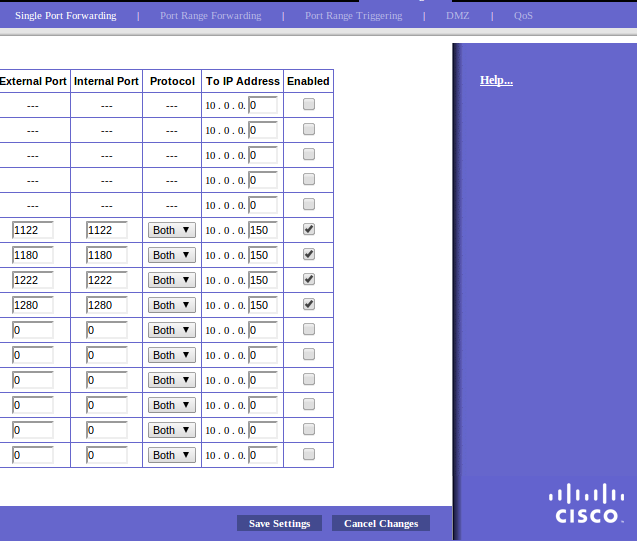
- (better), use the firewall on the container host to forward ports:
iptables -A PREROUTING -t nat -i eth0 -p tcp --dport 1180 -j DNAT --to 10.0.3.11:80
iptables -A PREROUTING -t nat -i eth0 -p tcp --dport 1280 -j DNAT --to 10.0.3.12:80
iptables -A PREROUTING -t nat -i eth0 -p tcp --dport 1122 -j DNAT --to 10.0.3.11:22
iptables -A PREROUTING -t nat -i eth0 -p tcp --dport 1222 -j DNAT --to 10.0.3.12:22
This results in the following iptables:
root@apollo:/var/lib/lxc/cn1# iptables -vnL -t nat
Chain PREROUTING (policy ACCEPT 54 packets, 7138 bytes)
 pkts bytes target     prot opt in     out     source               destination
    0     0 DNAT       tcp  --  eth0   *       0.0.0.0/0            0.0.0.0/0            tcp dpt:1180 to:10.0.3.11:80
    0     0 DNAT       tcp  --  eth0   *       0.0.0.0/0            0.0.0.0/0            tcp dpt:1280 to:10.0.3.12:80
    2   120 DNAT       tcp  --  eth0   *       0.0.0.0/0            0.0.0.0/0            tcp dpt:1122 to:10.0.3.11:22
    1    60 DNAT       tcp  --  eth0   *       0.0.0.0/0            0.0.0.0/0            tcp dpt:1222 to:10.0.3.12:22

Chain INPUT (policy ACCEPT 17 packets, 2581 bytes)
 pkts bytes target     prot opt in     out     source               destination

Chain OUTPUT (policy ACCEPT 0 packets, 0 bytes)
 pkts bytes target     prot opt in     out     source               destination

Chain POSTROUTING (policy ACCEPT 3 packets, 180 bytes)
 pkts bytes target     prot opt in     out     source               destination
   29  2037 MASQUERADE  all  --  *      *       10.0.3.0/24         !10.0.3.0/24
root@apollo:/var/lib/lxc/cn1#
This last NATing can also be used to direct traffic from the wireless modem, for example the 22 and 80 ports :
Remote "copying" containers.#
We want to be able to have remote backup of the containers.
A very simple straight-forward way is :
- on the target host, remove (or rename temporary) /var/lib/lxc/cn1/rootfs
- on the source host, issue :
root@apollo:/var/lib/lxc/cn1# tar -c rootfs | ssh 10.0.0.164 tar -x -C /var/lib/lxc/cn1This will copy the complete root filesystem of container cn1 to the other host at 10.0.0.164. There is always at least one file to change after this action, and that is the ip address in /etc/network/interfaces
