Installation Ubuntu Lucid Lynx#
(also used for Maverick Meerkat, Natty Narwhal and Oneiric Oncelot)
Installed software#
- Plain install from live CD (created USB startup disk for that)
- installed extra packages:
- openssh-server
- htop
- sensors-applet
- flashplugin-installer
- gpsbabel
- sun-java6-jdk sun-java6-source sun-java6-plugin (first synaptic => repos => other repos => enable lucid partner)
- since 11.10 sun is also not anymore in the partner repo's, download from java.sun.com, extract to /opt/jdk1.6_...., and add it to the PATH in /etc/profile
- checkgmail
- download and install eclipse
- play an mp3, and you get prompted to install the required codecs....
- vlc and few more "ugly" and "bad" gstreamer packages
- subversion
- acpi
- libdvdcss2 from http://download.videolan.org/pub/libdvdcss/1.2.8/deb

- nethogs (show per process bandwith usage )
- iftop
- mysql-client mysql-server
- libnss3-tools (certutil)
- chmsee (viewing windows help files , .chm)
- guake terminal
- virtualbox-ose virtualbox-guest-additions
- acroread
- wammu (phone management)
- XSane (scanner software)
- bluez-utils
- alacarte (11.10 and up, for changing your menu's)
- ssh-askpass (kubuntu only)
- p7zip-full
- gparted
- imagemagick
- subversion from separate .deb (see below)
- ant
- puddletag (id3 mp3 tag editor)
- ia32-libs (if running 64bit OS, you need it for android sdk for example)
- keepassx
Natty Narwhal tweaks#
sudo add-apt-repository ppa:alexeftimie/ppa
sudo apt-get update
sudo apt-get install indicator-sysmonitor
sudo apt-get install openjdk-6-jdk
- keyboard preferences: edit /etc/kbd/config : KEYBOARD_RATE and KEYBOARD_DELAY
- powermanagement settings can be found by searching for "preferences" in the application.
- replace checkgmail with gm-notify
Kernel compile#
With my latest 13.10 install I noticed that kernel compile is not required, you can do it with grub2Because my HP 6830s laptop has a buggy DSDT, I have to change that. Since Linus decided that kernels no longer accept custom DSDT's I have to recompile the kernel to get this done.
I found a useful link here : http://ubuntuforums.org/showthread.php?t=1341580
And afterwards another one here : http://blog.avirtualhome.com/2010/05/05/how-to-compile-a-ubuntu-lucid-kernel/
So, what I did is download the kernel source from http://archive.ubuntu.com/ubuntu/pool/main/l/linux/, and :
dpkg -i /home/metskem/Downloads/linux-source-2.6.35_2.6.35-22.34_all.deb
sudo apt-get install fakeroot kernel-wedge build-essential makedumpfile
sudo apt-get build-dep linux
sudo apt-get install qt3-dev-tools libqt3-mt-dev kernel-package
mkdir src
cd src
tar xjf /usr/src/linux-source-2.6.32.tar.bz2
cd linux-source-2.6.32/
cp -vi /boot/config-`uname -r` .config
make xconfig .......
click in left pane on ACPI, and then double click in right pane on custom DSDT and fill in the fullname of your custom dsdt (for example /home/metskem/dsdt/dsdt.hex.
Then we'll continue:
export CONCURRENCY_LEVEL=3   # put both intel cores to work :-)
time fakeroot make-kpkg --initrd --append-to-version=dh kernel-image kernel-headers | tee /home/metskem/kernel-compile.log
see log
.......
real	66m15.850s
user	93m31.899s
sys	14m9.749s
Now install the kernel :
metskem@gneisenau:~/src$ sudo dpkg -i linux-image-3.0.6dh_3.0.6dh-10.00.Custom_i386.deb
[sudo] password for metskem:
Selecting previously deselected package linux-image-3.0.6dh.
(Reading database ... 109763 files and directories currently installed.)
Unpacking linux-image-3.0.6dh (from linux-image-3.0.6dh_3.0.6dh-10.00.Custom_i386.deb) ...
Done.
Setting up linux-image-3.0.6dh (3.0.6dh-10.00.Custom) ...
Running depmod.
Examining /etc/kernel/postinst.d.
run-parts: executing /etc/kernel/postinst.d/initramfs-tools 3.0.6dh /boot/vmlinuz-3.0.6dh
update-initramfs: Generating /boot/initrd.img-3.0.6dh
run-parts: executing /etc/kernel/postinst.d/pm-utils 3.0.6dh /boot/vmlinuz-3.0.6dh
run-parts: executing /etc/kernel/postinst.d/update-notifier 3.0.6dh /boot/vmlinuz-3.0.6dh
run-parts: executing /etc/kernel/postinst.d/zz-update-grub 3.0.6dh /boot/vmlinuz-3.0.6dh
Generating grub.cfg ...
Found linux image: /boot/vmlinuz-3.0.6dh
Found initrd image: /boot/initrd.img-3.0.6dh
Found linux image: /boot/vmlinuz-3.0.0-12-generic
Found initrd image: /boot/initrd.img-3.0.0-12-generic
Found memtest86+ image: /boot/memtest86+.bin
Found Windows Vista (loader) on /dev/sda1
Found Windows Vista (loader) on /dev/sda3
Found Ubuntu 11.10 (11.10) on /dev/sda6
done
metskem@gneisenau:~/src$ sudo dpkg -i linux-headers-3.0.6dh_3.0.6dh-10.00.Custom_i386.deb
Selecting previously deselected package linux-headers-3.0.6dh.
(Reading database ... 114020 files and directories currently installed.)
Unpacking linux-headers-3.0.6dh (from linux-headers-3.0.6dh_3.0.6dh-10.00.Custom_i386.deb) ...
Setting up linux-headers-3.0.6dh (3.0.6dh-10.00.Custom) ...
Examining /etc/kernel/header_postinst.d.
Miscellaneous#
Eclipse #
Eclipse fails withjava.lang.IllegalArgumentException: invalid qualifier: 11+drm33 at org.osgi.framework.Version.validate(Version.java:188) at org.osgi.framework.Version.<init>(Version.java:92) ....Solved by adding -vmargs -Dorg.osgi.framework.os.version=2.6.32.11+drm33.2dh01 to /usr/local/eclipse/eclipse.ini.
Also added -Djava.library.path=/usr/lib/jni to eclipse.ini to get subversion working.
Eclipse juno
The tab font is very large by default, you can change it by tweaking the css : /usr/local/eclipse/plugins/org.eclipse.platform_4.2.0.v201206081400/css/e4_default_gtk.css
Subversion : Install Subversive with the SVNKit 1.7.x .
Create icon in taskbar Create file .local/share/applications/opt_eclipse.desktop with the following contents:
[Desktop Entry]
Type=Application
Name=Eclipse
Comment=Eclipse Integrated Development Environment
Icon=/usr/local/eclipse/icon.xpm
Exec=/usr/local/eclipse/eclipse
Terminal=false
Categories=Development;IDE;Java;
Subversion#
Unfortunately 12.04 comes with an old 1.6 subversion, so I upgraded that to 1.7.1 with the two debs at http://svn-ref.assembla.com/download-clients.html#Ubuntu (also locally available in the Downloads dir now)
Citrix#
Install the Citrix receiver .deb file from the Citrix download site.
Additionally I had to download a "Verisign Class 3 Public Primary CA - G5" from http://www.verisign.com/repository/roots/root-certificates/PCA-3G5.pem and download it to /opt/Citrix/ICAClient/keystore/cacerts/PCA-3G5.pem
(in Ubuntu 12.10, this last thing is not necessary anymore)
Wireless driver#
I added a file named ´´intel-5300-iwlagn-disable11n.conf´´ to /etc/modprobe.d containing the following to get my wireless working properly (I had lots of SYN_SENT TCP sessions) :
options iwlagn 11n_disable=1
Memory usage Eclipse#
Running Eclipse with the OpenJDK, it requires excessive amounts of storage (I don't mean heap storage), run top command, and it will have "VIRT 1.8G" and "RES 1.1G", leaving hardly any memory left for anything else (I only have 2G in my laptop) I removed openjdk and downloaded the sun6 jdk, now I get "VIRT 911M" and "RES 310M".
Suspend resume fix #
For my wife's ASUS X54L I had to tweak some for the suspend/resume to work.
Thanks to the guy who posted: http://thecodecentral.com/2011/01/18/fix-ubuntu-10-10-suspendhibernate-not-working-bug/comment-page-8
Added script /etc/pm/sleep.d/./20_custom-ehci_hcd :
#!/bin/sh
#inspired by http://art.ubuntuforums.org/showpost.php?p=9744970&postcount=19
#...and http://thecodecentral.com/2011/01/18/fix-ubuntu-10-10-suspendhibernate-not-working-bug
# tidied by tqzzaa :)

VERSION=1.1
DEV_LIST=/tmp/usb-dev-list
DRIVERS_DIR=/sys/bus/pci/drivers
DRIVERS="ehci xhci" # ehci_hcd, xhci_hcd
HEX="[[:xdigit:]]"
MAX_BIND_ATTEMPTS=2
BIND_WAIT=0.1

unbindDev() {
  echo -n > $DEV_LIST 2>/dev/null
  for driver in $DRIVERS; do
    DDIR=$DRIVERS_DIR/${driver}_hcd
    for dev in `ls $DDIR 2>/dev/null | egrep "^$HEX+:$HEX+:$HEX"`; do
      echo -n "$dev" > $DDIR/unbind
      echo "$driver $dev" >> $DEV_LIST
    done
  done
}

bindDev() {
  if [ -s $DEV_LIST ]; then
    while read driver dev; do
      DDIR=$DRIVERS_DIR/${driver}_hcd
      while [ $((MAX_BIND_ATTEMPTS)) -gt 0 ]; do
          echo -n "$dev" > $DDIR/bind
          if [ ! -L "$DDIR/$dev" ]; then
            sleep $BIND_WAIT
          else
            break
          fi
          MAX_BIND_ATTEMPTS=$((MAX_BIND_ATTEMPTS-1))
      done
    done < $DEV_LIST
  fi
  rm $DEV_LIST 2>/dev/null
}

case "$1" in
  hibernate|suspend) unbindDev;;
  resume|thaw)       bindDev;;
esac
Samsung NP900X3C tweaks#
Everything works out of the box, except:
- keyboard backlight, the Fn keys (F9 F10) do not work, a workaround can issuing these commands :
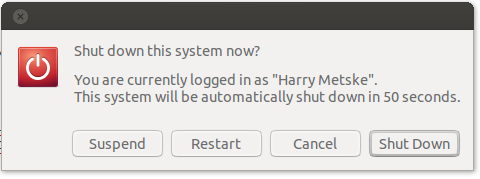
, clicking the suspend option does nothing. What does work is clicking the right most button and selecting suspend. This link to nonobis
describes an excellent update to udev to make the backlit fn-keys work perfectly.
eclipse
Eclipse tweaks again, both added the .gtkrc-2.0 (see Installatie Ubuntu Jaunty Jackalope#GTKRC), and changed the e4_default_gtk.css, see http://blog.nanthrax.net/2012/07/change-tab-font-in-eclipse-juno/
Keyboard backlight
The keys do not work, so the following workaround.
First a sudo rule, so anyone can execute the required cmd:
User_Alias      ALLEN = gast,metskem

Cmnd_Alias NETBOOK_CMDS = /usr/local/sbin/kbdlight *

ALLEN ALL=(ALL) NOPASSWD: NETBOOK_CMDS
If you press the Fn keys (F9 and F10), the following pops up in the kern.log:
Oct 15 20:01:22 gneisenau kernel: [22026.303943] atkbd serio0: >Unknown key pressed (translated set 2, code 0x97 on isa0060/serio0).
Oct 15 20:01:22 gneisenau kernel: [22026.303954] atkbd serio0: >Use 'setkeycodes e017 <keycode>' to make it known.
Oct 15 20:43:15 gneisenau kernel: [24030.623358] atkbd serio0: >    Unknown key pressed (translated set 2, code 0x96 on isa0060/serio0).
Oct 15 20:43:15 gneisenau kernel: [24030.623370] atkbd serio0: >Use 'setkeycodes e016 <keycode>' to make it known.
^
You can use the setkeycodes to map a scancode to a keycode.
You first should find what keycodes are still free, the xmodmap -pk command will show you that, in my case, I used the following codes:
root@gneisenau:/var/log# setkeycodes e016 93
root@gneisenau:/var/log# setkeycodes e017 97
--- did not finish this tweak ----
But found this http://blog.nonobis.nl/?p=11/ an excellent description of how to fix the backlight issue by correcting udev.