coursera-android#
Table of Contents
Time spent#
| Day | hours |
|---|---|
| 2014-01-21 | 1 |
| 2014-01-22 | 1 |
| 2014-01-23 | 1 |
| 2014-01-25 | 2 |
TODO#
Weeks#
Week 1#
- You can telnet to your emulator, the port is in the title of your emulator (5554).
- manipulate device while logged in :
- network speed edge or network speed full or power capacity 5 or power status not-charging or geo fix 0.00 40.00 or sms send 301555555 "test msg" , see here for more:
metskem@athena ~ $ telnet localhost 5554
Trying 127.0.0.1...
Connected to localhost.
Escape character is '^]'.
Android Console: type 'help' for a list of commands
OK
help
Android console command help:

    help|h|?         print a list of commands
    event            simulate hardware events
    geo              Geo-location commands
    gsm              GSM related commands
    cdma             CDMA related commands
    kill             kill the emulator instance
    network          manage network settings
    power            power related commands
    quit|exit        quit control session
    redir            manage port redirections
    sms              SMS related commands
    avd              control virtual device execution
    window           manage emulator window
    qemu             QEMU-specific commands
    sensor           manage emulator sensors

try 'help <command>' for command-specific help
OK
- you can run multiple emulators, and one let call the other, the number is equal to the port number again
- DDMS = Dalvik Debug Monitor Service
- method tracing
- logcat (cmdline syntax)
 , for example:
adb -s emulator-5554 logcat WikiNotes:I *:S
- -s emulator-5554 to select the (virtual) device, if you have more than one running
- WikiNotes:I - Informational messages for tag WikiNotes
- *:S - All other tags to Silent
week 2#
Four main building blocks in Android :
- Activity - Interaction with user (input and output)
- single focused task for the user
- Service - Long running background stuff
- for example the Music app
- support interaction with remote processes
- BroadcastReceiver - Receive and act upon events in Android
- events are represented by the Intent class
- only for Intents they have registered themselves for
- ContentProvider - Provide services to applications (input and output)
- store and share date
- database style interface
- handles interprocess comms
Non code (resource) files
- res/values/*.xml - Strings, String arrays, Plurals
- Accessed by other resources as @string/string_name
- Accessed in Java as R.string.string_name
- res/layout/*.xml
- Accessed by other resources as @layout/layout_name
- Accessed in Java as R.layout.layout_name
Activity
The Activity Lifecycle:
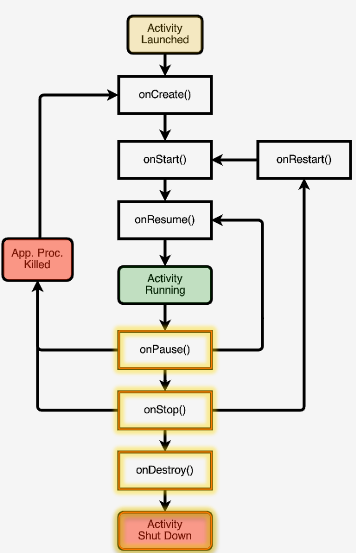
- Typical onCreate() workflow
- Restore saved state (super.onCreate() )
- Set content view
- Initialize UI elements
- Keep references to UI elements if necessary
- Link UI elements to code actions
-- onRestart() , do specific stuff required after activity was stopped
-- onStart() , loading persistent application state
-- onResume() , start foreground-only actions
-- onPause() , shutdown foreground-only actions, save persistent stat
-- onStop() , cache state (may not be called when Android kills the activity)
-- onDestroy() , release activity resources (may not be called when Android kills the activity)
Activities are created by creating Intents, and passing these Intents to startActivity() or startActivityForResult() . Started activity can set the result with Activity.setResult().
AndroidManifest.xml
Contains:
- Application Name
- Components
- Other
- Required permissions
- Application features
- Minimum API level
