coursera-android#
Table of Contents
Time spent#
| Day | hours |
|---|---|
| 2014-01-21 | 1 |
| 2014-01-22 | 1 |
| 2014-01-23 | 1 |
| 2014-01-25 | 2 |
| 2014-01-31 | 1 |
| 2014-02-01 | 2 |
TODO#
Weeks#
Week 1#
- You can telnet to your emulator, the port is in the title of your emulator (5554).
- manipulate device while logged in :
- network speed edge or network speed full or power capacity 5 or power status not-charging or geo fix 0.00 40.00 or sms send 301555555 "test msg" , see here for more:
metskem@athena ~ $ telnet localhost 5554
Trying 127.0.0.1...
Connected to localhost.
Escape character is '^]'.
Android Console: type 'help' for a list of commands
OK
help
Android console command help:

    help|h|?         print a list of commands
    event            simulate hardware events
    geo              Geo-location commands
    gsm              GSM related commands
    cdma             CDMA related commands
    kill             kill the emulator instance
    network          manage network settings
    power            power related commands
    quit|exit        quit control session
    redir            manage port redirections
    sms              SMS related commands
    avd              control virtual device execution
    window           manage emulator window
    qemu             QEMU-specific commands
    sensor           manage emulator sensors

try 'help <command>' for command-specific help
OK
- you can run multiple emulators, and one let call the other, the number is equal to the port number again
- DDMS = Dalvik Debug Monitor Service
- method tracing
- logcat (cmdline syntax)
 , for example:
adb -s emulator-5554 logcat WikiNotes:I *:S
- -s emulator-5554 to select the (virtual) device, if you have more than one running
- WikiNotes:I - Informational messages for tag WikiNotes
- *:S - All other tags to Silent
week 2#
Four main building blocks in Android :
- Activity - Interaction with user (input and output)
- single focused task for the user
- Service - Long running background stuff
- for example the Music app
- support interaction with remote processes
- BroadcastReceiver - Receive and act upon events in Android
- events are represented by the Intent class
- only for Intents they have registered themselves for
- ContentProvider - Provide services to applications (input and output)
- store and share date
- database style interface
- handles interprocess comms
Non code (resource) files
- res/values/*.xml - Strings, String arrays, Plurals
- Accessed by other resources as @string/string_name
- Accessed in Java as R.string.string_name
- res/layout/*.xml
- Accessed by other resources as @layout/layout_name
- Accessed in Java as R.layout.layout_name
Activity
The Activity Lifecycle:
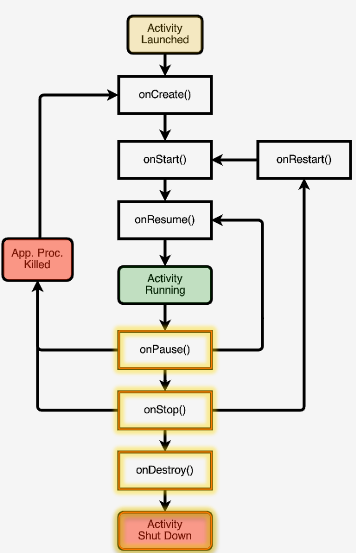
- Typical onCreate() workflow
- Restore saved state (super.onCreate() )
- Set content view
- Initialize UI elements
- Keep references to UI elements if necessary
- Link UI elements to code actions
-- onRestart() , do specific stuff required after activity was stopped
-- onStart() , loading persistent application state
-- onResume() , start foreground-only actions
-- onPause() , shutdown foreground-only actions, save persistent stat
-- onStop() , cache state (may not be called when Android kills the activity)
-- onDestroy() , release activity resources (may not be called when Android kills the activity)
Activities are created by creating Intents, and passing these Intents to startActivity() or startActivityForResult() . Started activity can set the result with Activity.setResult().
AndroidManifest.xml
Contains:
- Application Name
- Components
- Other
- Required permissions
- Application features
- Minimum API level
week 3#
Intents
Intent is a data structure that represents:
- an operation to be performed
- an event that has occurred
Intent fields:
- action - specifies the desired action (action_dial, action_edit, action_sync)
- data - data associated with the intent, specified as a URI (Uri.parse("tel:0548512395")
- category - additional info about components that can handle the intent (category_launcher or category_browser)
- type - the mime type of the intent
- component - the component that should receive the intent (always one activity)
- extras - a Map of key-value pairs
- flags - specify how intent should be handled, a few special flags: FLAG_ACTIVITY_NO_HISTORY (dont put activity in history stack) FLAG_DEBUG_LOG_RESOLUTION (extra logging when intent is processed)
Activity is a subclass of Context, so you can for example use new Intent(MyActivity.this, SecondActivity.class);
Two ways of Intent resolution:
- explicit - the Intent has the "target" class name specified, the target Activity will be called directly
- implicit - Android tries to match the Intent with the capabilities of the installed apps.
Implicit Intent resolution uses the following data of the Intent:
- ACTION
- DATA (URI and TYPE)
- CATEGORY
Installed apps have intent-filters defined in their AndroidManifest.xml.
These filters can specify things like data, action, category and so on. If they want to react to implicit intents, they always have to specify the intent-filter category.DEFAULT.
If you want to know what's on your device (for example all intent filters) :
adb shell dumpsys package
Permissions
Android uses permissions to protect Resources, data and operations.
Applications can define their own permissions to protect their own resources (other apps are required to have those permissions). (permission tag) And applications can define the permissions they use themselves (uses-permission).
There are application-level permissions and component-level permissions, the latter take precedence.
And we have :
- Activity permissions (used when calling startActivity() or startActivityForResult()
- Service permissions (used when calling stop/start/bindService()
- broadcastreceiver permissions (restricts which components can send and receive broadcasts)
- contentprovider permissions (restricts which components can read/write data in a content provider)