Apache Brooklyn#
Table of Contents
- Apache Brooklyn
- Intro
- Resources
- Installation
- Using
- Get Started on localhost
- Deploy to other hosts
- AutoScaling
- Deploy multiple applications to the same location pool
- Update an application
- Run a Tomcat8 server.
- Run in multiple docker containers on multiple hosts.
- Use pools of locations by name
- More valid location specifications
- Miscellaneous
- todo / issues / questions
- How to speed up nginx install ?
- How to clean up nodes ?
- Can I autoscale based on response time ?
- NullPointerException: jmx port must not be null for Tomcat8ServerImpl
- Runtime environments require internet access.
Intro#
Apache Brooklyn is currently an incubating Apache project.Use (yaml) blueprints to model your application (components) and describe the required infrastructure. But also deploy your app and manage (monitor) your application.
There is a Catalog with components to choose from, or write your own.
It has a nice web ui, but also everything available via REST interfaces.
Resources#
Installation#
Well, that is very easy:
- download tarball from https://brooklyn.incubator.apache.org/download/index.html
tar -zxf brooklyn-0.7.0-incubating-dist.tar.gz
cd brooklyn-0.7.0-incubating
bin/brooklyn launch
It will log to 2 files in the current directory brooklyn.info.log brooklyn.debug.log.
If you have not created a ~/.brooklyn/brooklyn.properties file with special settings, you will get anonymous admin access at http://localhost:8081, but only if you come from localhost. If you come from other hosts (like when you run it in a docker container then you get basic auth), the password is generated each time the server is started and is logged to the brooklyn.info.log file:
2015-08-08 19:12:56,404 INFO b.r.s.p.BrooklynUserWithRandomPasswordSecurityProvider [brooklyn-jetty-server-8081-qtp1042232199-22]: Allowing access to web console from localhost or with brooklyn:m01u2ll1H2
I decided to run it in a Docker container, the Dockerfile and other stuff are in my private my gitblit.
I also have a Docker container for brooklyn nodes (so we can get very predictable targets for brooklyn).
Both Dockerfiles are "subclassed" from phusion/baseimage.
Using#
Get Started on localhost#
I first followed the get started and the deploying a blueprint, which deploys a MySQL DB, a Tomcat7 server and an nginx frontending webserver, all to localhost.
This went well, but make sure that the user brooklyn can ssh to localhost with pub/priv key, no password and no password phrase, and that this user can sudo su - to do all the necessary stuff (the main reason to run it in a Docker container).
So this went rather smooth, note that in the above example you can run all components (MySQL, Tomcat, nginx) on the same target (location), namely localhost.
Deploy to other hosts #
The next experiment was to deploy to a host other than the host where the brooklyn server is running. So, therefore I fired up a second Docker container, arranged ssh and sudo access to that, and tried to deploy the following blueprint :
name: webnode1

services:

- type: brooklyn.entity.webapp.ControlledDynamicWebAppCluster
  name: My Web
  location:
    byon:
      hosts:
      - brooklyn@172.17.0.76
  brooklyn.config:
    wars.root: http://search.maven.org/remotecontent?filepath=io/brooklyn/example/brooklyn-example-hello-world-sql-webapp/0.6.0/brooklyn-example-hello-world-sql-webapp-0.6.0.war
    java.sysprops:
      brooklyn.example.db.url: >
        $brooklyn:formatString("jdbc:%s%s?user=%s&password=%s",component("db").attributeWhenReady("datastore.url"),"visitors", "brooklyn", "br00k11n")

- type: brooklyn.entity.database.mysql.MySqlNode
  id: db
  name: My DB
  location:
    byon:
      hosts:
      - brooklyn@172.17.0.76
  brooklyn.config:
    creationScriptUrl: https://bit.ly/brooklyn-visitors-creation-script
Which basically is a copy of the previous excercise. Note that 172.17.0.76 is the IP address of the second Docker container node1.
This kept failing with No machines available in FixedListMachineProvisioningLocation.
Googled this, but in general you do not get much results foor Apache Brooklyn. After poking around quite a bit I concluded (not sure) that brooklyn cannot run the tomcat server on the same host as where nginx (or MySQL) is running (except for localhost)?
So I only added an additional host to the location, and it all worked fine.
Nice to see you get real time stats in your web UI (or REST if you like).
I ran a simple loadtest script against the application's URL, and you nicely see the effects on the stats.
Time for next experiment, autoscaling.
AutoScaling#
We want to be able to automatically scale the number of Tomcat instances, depending on something like response time or request rate.
First we change the Docker setup a little bit, we remove all existing containers and start a bunch of nodes and one brooklyn master:
NUM_NODES=50
for N in `seq $NUM_NODES`
do
  docker run -d --publish 220${N}:22 --publish 600${N}:6000 --hostname node${N} --name node${N} brooklyn-node
  linkopts="$linkopts --link node${N}:node${N}"
done

docker run -d --publish 2200:22 --publish 18081:8081 --hostname brooklyn-master --name brooklyn-master $linkopts brooklyn
So, from the master, we can access all nodes by their name. (Mind that if one of the node containers go down, that is no longer true, or you manually fix the /etc/hosts file in the master).
Because we don't want to have ever random passwords for the web UI, we create a ~brooklyn/.brooklyn/brooklyn.properties file, and have the following lines in there:
brooklyn.webconsole.security.users=admin
brooklyn.webconsole.security.user.admin.password=password
Als make sure you chmod 700 brooklyn.properties or the server will refuse to start :-) . And kill the brooklyn process (it is restarted automagically).
Brooklyn has, by default the following locations configured in brooklyn.properties:
aws-california
aws-ireland
aws-oregon
aws-tokyo
localhost
Now we add in there :
brooklyn.location.named.dockerpool=byon:(hosts="node{1-9}")
Now we reload the properties via the Web UI (no brooklyn restart required).
Next we deploy about the same app as in the previous chapter, except the location now refers to the predefined location :
name: webnode1

services:

- type: brooklyn.entity.webapp.ControlledDynamicWebAppCluster
  name: My Web
  location: dockerpool
  brooklyn.config:
    wars.root: http://search.maven.org/remotecontent?filepath=io/brooklyn/example/brooklyn-example-hello-world-sql-webapp/0.6.0/brooklyn-example-hello-world-sql-webapp-0.6.0.war
    java.sysprops:
      brooklyn.example.db.url: >
        $brooklyn:formatString("jdbc:%s%s?user=%s&password=%s",component("db").attributeWhenReady("datastore.url"),"visitors", "brooklyn", "br00k11n")

- type: brooklyn.entity.database.mysql.MySqlNode
  id: db
  name: My DB
  location: dockerpool
  brooklyn.config:
    creationScriptUrl: https://bit.ly/brooklyn-visitors-creation-script
What you can do now is (by hand) adding a policy to the brooklyn.entity.webapp.ControlledDynamicWebAppCluster.
Eventually this comes down to the following yaml (that you can submit to brooklyn), after fiddling a bit with the settings and looking at brooklyn's behaviour :
name: webnode2

services:

- type: brooklyn.entity.webapp.ControlledDynamicWebAppCluster
  name: MyWebCluster2
  initialSize: 2
  location: dockerpool
  brooklyn.config:
    wars.root: http://search.maven.org/remotecontent?filepath=io/brooklyn/example/brooklyn-example-hello-world-sql-webapp/0.6.0/brooklyn-example-hello-world-sql-webapp-0.6.0.war
    java.sysprops:
       brooklyn.example.db.url: >
        $brooklyn:formatString("jdbc:%s%s?user=%s&password=%s",
        component("db2").attributeWhenReady("datastore.url"),
        "visitors", "brooklyn", "br00k11n")
  brooklyn.policies:
  - policyType: brooklyn.policy.autoscaling.AutoScalerPolicy
    brooklyn.config:
      metric: $brooklyn:sensor("brooklyn.entity.webapp.DynamicWebAppCluster", "webapp.reqs.perSec.windowed.perNode")
      metricLowerBound: 3
      metricUpperBound: 5
      minPoolSize: 2
      maxPoolSize: 4
      resizeDownIterationIncrement: 1
      resizeUpIterationIncrement: 1
      resizeUpStabilizationDelay: 50000
      resizeDownStabilizationDelay: 70000
- type: brooklyn.entity.database.mysql.MySqlNode
  id: db2
  name: MyDB2
  location: dockerpool
  brooklyn.config:
    creationScriptUrl: https://bit.ly/brooklyn-visitors-creation-script
Testng was done by throwing this simple script at the nginx endpoint :
while true;
do
  curl --silent --show-error http://172.17.0.226:8000/db.jsp >/dev/null && echo -n "." ;
  sleep 0.15s;
done
In short the behaviour:
- we fire up the whole thing
- we start one instance of this loadrunner script driving the "webapp.reqs.perSec.windowed.perNode" to about 3
- start more instances of the loadrunner script
- the "webapp.reqs.perSec.windowed.perNode" goes up to 7
- after 50 seconds an additional Tomcat instance is fired up
- the "webapp.reqs.perSec.windowed.perNode" drops below 5 now, and we keep running 3 Tomcat instances
- we start more instances of the loadrunner script, the "webapp.reqs.perSec.windowed.perNode" goes up to above 5 again
- after 50 seconds again an additional Tomcat is started
- throwing more load at it does not make more Tomcat's since we set the maxPoolSize to 4
- we kill a couple of loadrunner scripts until the "webapp.reqs.perSec.windowed.perNode" drops below 3
- then one Tomcat is killed and we are back to 3 instances
- "webapp.reqs.perSec.windowed.perNode" goes to between 3-5 and we remain at 3 instances
- we kill more loadrunner scripts until "webapp.reqs.perSec.windowed.perNode" drops below 3
- an additional Tomcat is killed
- we stop the load completely, driving "webapp.reqs.perSec.windowed.perNode" to 0
- we keep running 2 Tomcat instances, since minPoolSize is 2
Deploy multiple applications to the same location pool#
What happens if you deploy multiple (dozens or maybe hundreds) applications to the same location pool.If you deploy multiple applications to the same location, they will probably end up on the same host, this usually fails with "ssh: check-running MySqlNodeImpl".
Mind that you will get port conflicts when running multiple (the same) applications on the same location.
You can however run the exact same application (only different name, rest the same) to a different location pool.
Update an application#
You are running your application on brooklyn, and want to update that application without downtime, how to handle?Run a Tomcat8 server.#
That is rather easy:
- type: brooklyn.entity.webapp.ControlledDynamicWebAppCluster
  name: MyTC8Cluster
  initialSize: 1
  location: GoogleEU
  brooklyn.config:
    memberSpec:
      $brooklyn:entitySpec:
        type: brooklyn.entity.webapp.tomcat.Tomcat8Server
        install.version: 8.0.26
        http.port: 8001
        java.sysprops:
          file.encoding: UTF-8
.....
Run in multiple docker containers on multiple hosts.#
The problem with Docker containers is that you can run dozens of them on a docker host, but they are all behind one IP address, you have to do portmappings to get to a specific port in your container, and you get port conflicts if you want to access different containers on the same host on the same port.
In that case you would need multiple IP addresses.
Especially brooklyn expects hosts on the same location to be on a unique IP (you cannot define multiple hosts with the same IP but different ports).
That's why I want to see if the following setup works:
- run multiple containers on multiple docker hosts.
- each container is ssh-reachable on a unique host:port (host1:2201,host1:2202,host2:2201,host2:2202).
- each container on one host has unique docker port mappings for each port required for brooklyn (5000,6000,8000,more...)
- only the ssh port is mapped differently for each container
Probably unclear what I say here, so a concrete example setup :
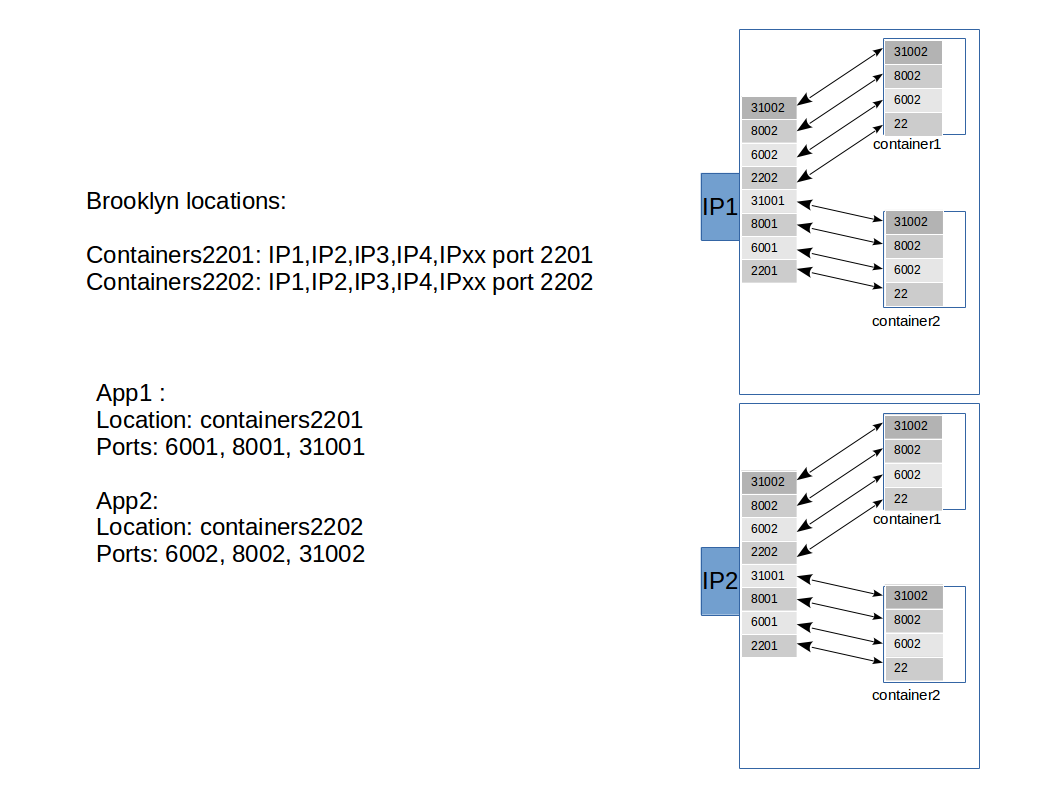 |
The containers have to be started (on each docker host) as follows :
docker run -d --publish 2201:22 --publish 5001:5001 --publish 6001:6001 --publish 8001:8001 --publish 31001:31001 --hostname node01 --name node01 brooklyn-node
docker run -d --publish 2202:22 --publish 5002:5002 --publish 6002:6002 --publish 8002:8002 --publish 31002:31002  --hostname node02 --name node02 brooklyn-node
docker run -d --publish 2203:22 --publish 5003:5003 --publish 6003:6003 --publish 8003:8003 --publish 31003:31003  --hostname node03 --name node03 brooklyn-node
Use pools of locations by name #
We want to use a pool of "servers" by name. I think it can be done by specifying locations in the brooklyn.properties file, and for example having a bunch of Docker containers available.
This can indeed be done that way, I specified this in ~brooklyn/.brooklyn/brooklyn.properties:
brooklyn.location.named.dockerpool=byon:(hosts="node{1-9}")
More valid location specifications#
  location:
    multi:
      targets:
        - named:node1
        - named:node2
        - named:node3
Miscellaneous#
- You can remove an application by selecting it in the left pane, selecting "Advanced" in the right pane, and the choose "Expunge".
- If your VM or container is rebooted/restarted, all brooklyn services are not automagically started....(to be tested, but make sure the container keeps the same IP address after restart). If you apply an AutoScaler policy you will solve this problem less or more.
- You can remove an application by selecting it in the left pane, selecting "Advanced" in the right pane, and the choose "Expunge".
- If your VM or container is rebooted/restarted, all brooklyn services are not automagically started. You can overcome this by attaching a ServiceFailureDetector, see the following sample yaml:
name: tomcat8Cluster

services:

- type: brooklyn.entity.webapp.ControlledDynamicWebAppCluster
  name: MyTC8Cluster
  initialSize: 1
  location: dockerpool3
  brooklyn.config:
    memberSpec:
      $brooklyn:entitySpec:
        type: brooklyn.entity.webapp.tomcat.Tomcat8Server
        install.version: 8.0.24
        brooklyn.enrichers:
        - type: brooklyn.policy.ha.ServiceFailureDetector
          brooklyn.config:
            # wait 15s after service fails before propagating failure
            serviceFailedStabilizationDelay: 10s
        brooklyn.policies:
        - policyType: brooklyn.policy.ha.ServiceRestarter
          brooklyn.config:
            # repeated failures in a time window can cause the restarter to abort,
            # propagating the failure; a time window of 0 will mean it always restarts!
            failOnRecurringFailuresInThisDuration: 10000
    wars.named:
      - https://www.computerhok.nl/tmp/JSPWiki.war
    shell.env:
      LANG: en_US.UTF-8
      jspwiki_pageProvider: VersioningFileProvider
      jspwiki_fileSystemProvider_pageDir: jspwiki-pages
      jspwiki_basicAttachmentProvider_storageDir: jspwiki-pages
      jspwiki_workDir: jspwiki-work
      jspwiki_baseURL: http://172.17.0.246:8000/JSPWiki
  brooklyn.policies:
  - policyType: brooklyn.policy.autoscaling.AutoScalerPolicy
    brooklyn.config:
      metric: $brooklyn:sensor("brooklyn.entity.webapp.DynamicWebAppCluster", "webapp.reqs.perSec.windowed.perNode")
      metricLowerBound: 3
      metricUpperBound: 5
      minPoolSize: 1
      maxPoolSize: 4
      resizeDownIterationIncrement: 1
      resizeUpIterationIncrement: 1
      resizeUpStabilizationDelay: 50000
      resizeDownStabilizationDelay: 70000
This gives the following in the log when you kill a tomcat instance:
Setting BasicApplicationImpl{id=LXPJt6vs} on-fire due to problems when expected running, up=false, not-up-indicators: {service-lifecycle-indicators-from-children-and-members=ControlledDynamicWebAppClusterImpl{id=wH5RqQDc} is not up}
Setting ControlledDynamicWebAppClusterImpl{id=wH5RqQDc} on-fire due to problems when expected running, up=false, problems: {service-lifecycle-indicators-from-children-and-members=Required entities not healthy: DynamicWebAppClusterImpl{id=a3jJ2d2e}, Tomcat8ServerImpl{id=L47viE6N}}
ServiceRestarter acting on failure detected at Tomcat8ServerImpl{id=L47viE6N} (FailureDescriptor{component=Tomcat8ServerImpl{id=L47viE6N}, description=service not up})
todo / issues / questions#
How to speed up nginx install ?#
Currently an nginx is compiled from source before it is run, takes a lot of cpu and time.
How to clean up nodes ?#
After deploying/expunging nginx a couple of time, I see this on the node:
brooklyn@node01:~/brooklyn-managed-processes/apps$ pwd;ls -l
/home/brooklyn/brooklyn-managed-processes/apps
total 16
drwxr-xr-x 3 brooklyn brooklyn 4096 Sep  2 15:36 EeUq9kLO
drwxr-xr-x 3 brooklyn brooklyn 4096 Sep  2 15:32 rTvwL65I
drwxr-xr-x 3 brooklyn brooklyn 4096 Sep  2 15:27 rgx1QQjw
drwxr-xr-x 3 brooklyn brooklyn 4096 Sep  2 15:37 vK404HjY
That should be cleaned away somehow...(cron ?)
Can I autoscale based on response time ?#
I can currently scale with the AutoScalerPolicy and (for example) the metric webapp.reqs.perSec.windowed.perNode.
But this is not a good metric, we should have something like response time, either from tomcat or from nginx.
There is a metric: webapp.reqs.processingTime.fraction.windowed.perNode : Fraction of time spent processing reported by webserver (percentage, over time window) averaged over all nodes
NullPointerException: jmx port must not be null for Tomcat8ServerImpl#
When I run a ControlledDynamicWebAppCluster with tomcat8 servers and the cluster is adding an additional server, this exception shows up. Th Tomcat8 instance is ON-FIRE then, when you look at the sensors, it is indeed missing jmx stuff :
First tomcat:
| Name | Value |
|---|---|
| jmx.agent.local.path | /home/brooklyn/brooklyn-managed-processes/apps/hYUOMMsL/entities/Tomcat8Server_N5oEPFyY/brooklyn-jmxmp-agent-shaded-0.8.0-incubating.jar |
| jmx.context | jmxrmi |
| jmx.direct.port | 31003 |
| jmx.service.url | service:jmx:jmxmp://10.0.0.162:31003 |
| rmi.registry.port | 1099 |
Second (failed) tomcat:
| Name | Value |
|---|---|
| jmx.context | jmxrmi |
| rmi.registry.port | 19099 |
The problem is intermittent.
Reported: https://issues.apache.org/jira/browse/BROOKLYN-170
Runtime environments require internet access.#
When you fire up a tomcat or nginx server, it (by default) downloads all binaries from the internet. You can "work around" this, by providing tar.gz's in ~brooklyn/.brooklyn :
/home/brooklyn/.brooklyn/repository/NginxController/1.8.0/nginx-1.8.0.tar.gz
/home/brooklyn/.brooklyn/repository/Tomcat8Server/8.0.26/apache-tomcat-8.0.26.tar.gz
But still during install it is performing apt-get updates, which will only work if you have internet access, haven't tested what happens if you run into a blocking firewall.