Android development notes.#
Resources#
- OpenIntents

- Android . . . API levels
- Android . . . Permissions
- MyFirstApp
- Android Developer Console
- Android Developer's Blog
- GCM, Google Cloud Messaging
Reading closed binary apk's.#
Unzipping most of your apk's on your device, you will find, that you cannot read even the AndroidManifest.xml file.
Well, use the apktool to decompile it, and see if you can learn something from it.
Here's an example :
metskem@gneisenau:~/AndroidStuff/misc$ ./apktool d --no-src apps/aokp-5.2/nl.ns.android.activity-1.apk apps/decoded/ns
I: Copying raw classes.dex file...
I: Loading resource table...
I: Loaded.
I: Loading resource table from file: /home/metskem/apktool/framework/1.apk
I: Loaded.
I: Decoding file-resources...
I: Decoding values*/* XMLs...
I: Done.
I: Copying assets and libs...
Activity lifecycle#
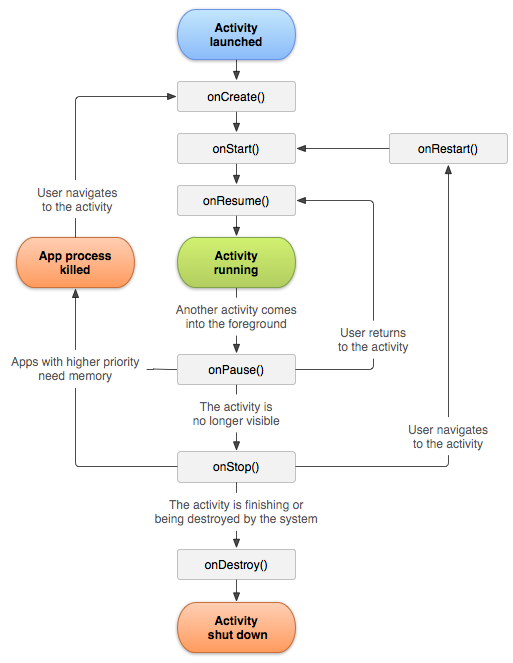
C2DM#
C2DM, or Cloud to Device Messaging, can be used to send small messages from a server to an Android device, see https://developers.google.com/android/c2dm/ for all details.
You could use it to tell an app to come and get updates or new data.
An application on an Android device doesn’t need to be running to receive messages. The system will wake up the application via Intent broadcast when the the message arrives...
Here is the diagram:

ADB#
The help#
Android Debug Bridge version 1.0.29

 -d                            - directs command to the only connected USB device
                                 returns an error if more than one USB device is present.
 -e                            - directs command to the only running emulator.
                                 returns an error if more than one emulator is running.
 -s <serial number>            - directs command to the USB device or emulator with
                                 the given serial number. Overrides ANDROID_SERIAL
                                 environment variable.
 -p <product name or path>     - simple product name like 'sooner', or
                                 a relative/absolute path to a product
                                 out directory like 'out/target/product/sooner'.
                                 If -p is not specified, the ANDROID_PRODUCT_OUT
                                 environment variable is used, which must
                                 be an absolute path.
 devices                       - list all connected devices
 connect <host>[:<port>]       - connect to a device via TCP/IP
                                 Port 5555 is used by default if no port number is specified.
 disconnect [<host>[:<port>]]  - disconnect from a TCP/IP device.
                                 Port 5555 is used by default if no port number is specified.
                                 Using this command with no additional arguments
                                 will disconnect from all connected TCP/IP devices.

device commands:
  adb push <local> <remote>    - copy file/dir to device
  adb pull <remote> [<local>]  - copy file/dir from device
  adb sync [ <directory> ]     - copy host->device only if changed
                                 (-l means list but don't copy)
                                 (see 'adb help all')
  adb shell                    - run remote shell interactively
  adb shell <command>          - run remote shell command
  adb emu <command>            - run emulator console command
  adb logcat [ <filter-spec> ] - View device log
  adb forward <local> <remote> - forward socket connections
                                 forward specs are one of:
                                   tcp:<port>
                                   localabstract:<unix domain socket name>
                                   localreserved:<unix domain socket name>
                                   localfilesystem:<unix domain socket name>
                                   dev:<character device name>
                                   jdwp:<process pid> (remote only)
  adb jdwp                     - list PIDs of processes hosting a JDWP transport
  adb install [-l] [-r] [-s] [--algo <algorithm name> --key <hex-encoded key> --iv <hex-encoded iv>] <file>
                               - push this package file to the device and install it
                                 ('-l' means forward-lock the app)
                                 ('-r' means reinstall the app, keeping its data)
                                 ('-s' means install on SD card instead of internal storage)
                                 ('--algo', '--key', and '--iv' mean the file is encrypted already)
  adb uninstall [-k] <package> - remove this app package from the device
                                 ('-k' means keep the data and cache directories)
  adb bugreport                - return all information from the device
                                 that should be included in a bug report.

  adb backup [-f <file>] [-apk|-noapk] [-shared|-noshared] [-all] [-system|-nosystem] [<packages...>]
                               - write an archive of the device's data to <file>.
                                 If no -f option is supplied then the data is written
                                 to "backup.ab" in the current directory.
                                 (-apk|-noapk enable/disable backup of the .apks themselves
                                    in the archive; the default is noapk.)
                                 (-shared|-noshared enable/disable backup of the device's
                                    shared storage / SD card contents; the default is noshared.)
                                 (-all means to back up all installed applications)
                                 (-system|-nosystem toggles whether -all automatically includes
                                    system applications; the default is to include system apps)
                                 (<packages...> is the list of applications to be backed up.  If
                                    the -all or -shared flags are passed, then the package
                                    list is optional.  Applications explicitly given on the
                                    command line will be included even if -nosystem would
                                    ordinarily cause them to be omitted.)

  adb restore <file>           - restore device contents from the <file> backup archive

  adb help                     - show this help message
  adb version                  - show version num

scripting:
  adb wait-for-device          - block until device is online
  adb start-server             - ensure that there is a server running
  adb kill-server              - kill the server if it is running
  adb get-state                - prints: offline | bootloader | device
  adb get-serialno             - prints: <serial-number>
  adb status-window            - continuously print device status for a specified device
  adb remount                  - remounts the /system partition on the device read-write
  adb reboot [bootloader|recovery] - reboots the device, optionally into the bootloader or recovery program
  adb reboot-bootloader        - reboots the device into the bootloader
  adb root                     - restarts the adbd daemon with root permissions
  adb usb                      - restarts the adbd daemon listening on USB
  adb tcpip <port>             - restarts the adbd daemon listening on TCP on the specified port
networking:
  adb ppp <tty> [parameters]   - Run PPP over USB.
 Note: you should not automatically start a PPP connection.
 <tty> refers to the tty for PPP stream. Eg. dev:/dev/omap_csmi_tty1
 [parameters] - Eg. defaultroute debug dump local notty usepeerdns

adb sync notes: adb sync [ <directory> ]
  <localdir> can be interpreted in several ways:

  - If <directory> is not specified, both /system and /data partitions will be updated.

  - If it is "system" or "data", only the corresponding partition
    is updated.

environmental variables:
  ADB_TRACE                    - Print debug information. A comma separated list of the following values
                                 1 or all, adb, sockets, packets, rwx, usb, sync, sysdeps, transport, jdwp
  ANDROID_SERIAL               - The serial number to connect to. -s takes priority over this if given.
  ANDROID_LOG_TAGS             - When used with the logcat option, only these debug tags are printed.
Linux setup#
Not all hardware devices are recognized by default, for example the HTC Desire C needs extra udev rules. I added /etc/udev/rules.d/51-android.rules containing the following content:
SUBSYSTEM=="usb", ATTR{idVendor}=="0bb4", MODE="0666", GROUP="plugdev"
Quick commands#
Install an app
adb -s 0123456789ABCDEF install bin/My-First-App.apk
You can omit the -s option, but if you have multiple devices ( adb devices ), you can use the ANDROID_SERIAL envvar to set the default device.
Uninstall an app
Well you need the fully qualified name now :-) :
adb uninstall com.example.myfirstapp
