After an earlier attempt to install Android Froyostone, which wasn't very successful , I gave it another try. This time with Android 2.3 , codename Gingerbread.
it's stable, no hangs yet (so that's definitely better than Froyostone).
power consumption is much less, while with Froyostone the battery was empty after 10 hours, with Gingerbread I get an estimated 45 hours with one charge, that's about the same as with WMO.
Apr 17 17:43:16 gneisenau kernel: [ 1016.680709] usb 2-5: new high speed USB device using ehci_hcd and address 7
Apr 17 17:43:16 gneisenau kernel: [ 1016.827079] scsi9 : usb-storage 2-5:1.0
Apr 17 17:43:17 gneisenau kernel: [ 1017.827874] scsi 9:0:0:0: Direct-Access     HTC      Android Phone    0100 PQ: 0 ANSI: 2
Apr 17 17:43:17 gneisenau kernel: [ 1017.829637] sd 9:0:0:0: Attached scsi generic sg2 type 0
Apr 17 17:43:17 gneisenau kernel: [ 1017.836351] sd 9:0:0:0: [sdb] Attached SCSI removable disk
some more investigation required.
no GoogleMaps installed, must be somewhere on the Market I guess , yup , installed, perfect, Google Maps Navigation , fine !
no VideoCamera app (video not supported ?), yes there is, it's a 2 in 1 app, for both camera and video, but no moving images, video does not work.
GPS does not work, when I start Google Maps Navigation, it keeps telling me that it is searching for GPS, still so after half an hour. I applied the GPS fix , copying libgps.so and lib.bravo.so (but did not help, after reboot, I get the same files again. This must have something to do with the fact that I run the SD Card version, the complete iso image is restored after reboot ?)
For enterprise EAS access, I installed Touchdown from Nitrodesk (If everything works out well I will probably buy the "non nag" version). But this Touchdown does not work on AmericanAndroid, as an alternative I installed Moxier Mail (trial first)
Installed QuickSSHD again, but can't access the IP address, probably due to USB not working yet.
Installed Terminal Emulator (so you can shell from your phone).
What not (yet) works is USB tehtering.
Also the battery consumption is much less than the previous one, it's now running 12 hours and battery is still 75 %, and I had about half an hour calling.
Looks good so far.


Android Gingerbread#
Table of Contents
After an earlier attempt to install Android Froyostone, which wasn't very successful , I gave it another try. This time with Android 2.3 , codename Gingerbread.
Resources#
Findings#
Good#
Less Good#
- USB (under Linux) does not work yet:
some more investigation required.I applied the GPS fix
Miscellaneous #
ROMs tried#
Now, I loaded a new ROM from http://android.hd2roms.com/AmeriCanAndroid AOSP HD2 GB233 CM7 (APR 18)#
Does not boot. It does if you add config.txt with "wince=1" in it. This is the best one so far, everythingg works :Nice clean look with small fonts.
Power consumption is disappointing, it takes 12 hours to drain the battery (With WMO it takes almost 3 days => ~72 hours)
In the meantime I upgraded a couple of times (now running 110829, and that works fine.
MccMBoxmaX GS v1.0 beta (18 APR)#
Does not boot.
BOYPPC-SHIFTPDA_GINGER (12.Apr)#
Does not boot, but does after editing the Android/startup.txt, added " set cmdline "rel_path=Android nand_boot=0" "
RAFDROID HD v4.2 (21.MAR.11)#
MDJ_GingerBread_HD2_v.1.0_RC5_RAM_STOCK#
This one works better. Almost all functions work:
What not (yet) works is USB tehtering.
Also the battery consumption is much less than the previous one, it's now running 12 hours and battery is still 75 %, and I had about half an hour calling. Looks good so far.
Let's see if we can get EAS access working.
MIUI#
This one is (for now) really the best one. Simply everything works (caller id, wifi, 3g, market app, camera, video, usb-tethering, GPS).
It has a good looking interface, most important it is very responsive.
Battery consumption is also very acceptable, not worse than americandroid.
Other nice things are the AppMonitor, numeric Battery indicator
The miui version is MUOI-1.11.18 (Android 2.3.7).
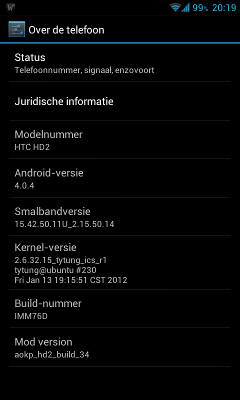
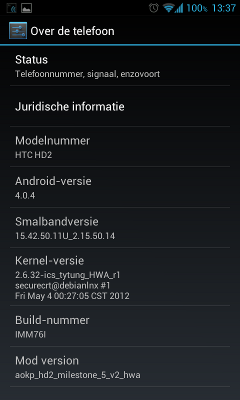
ICS 4.0.4 aokp#
The IceCreamTosti "distribution" is working very well. Here more details:
1)
2)
hosts file#
I also merged an ad free hosts file :
hosts
Apps to add by default#
If not in the distribution, the following apps I install always: